
Google Analytics 4 (GA4) has just released a native AI Assistant measurement feature. This update marks the first time Google has officially recognized AI chatbots as a distinct traffic channel. The most-wanted feature in this era of Answer Engine Optimization (AEO).
From now, you can track exactly how many users discovered your brand through an AI’s citation and clicked through to your site. Instead of guessing, you can now see exactly how many users discovered your brand through an AI’s citation and clicked through to your site.
In this guide, we’ll provide a step-by-step walkthrough of how to track AI Referrals with Google Analytics’ AI Assistant to track visitors from Google’s AI Overviews and conversational chatbots like ChatGPT, Claude, and Gemini,
Plus, we’ll break down why this feature is the most important update to analyze, and optimize for the traffic of the future.
Table of Contents
How the New AI GA4 Classification Works (The Technical Logic)
To properly analyze your Answer Engine Optimization (AEO) efforts, it’s crucial to understand how GA4 is actually processing this data under the hood. No worries, you don’t need to have super technical knowledge, but knowing the “plumbing” will save you from misinterpreting your reports.
Before this update, many marketers relied on complex, manual “regex” (Regular Expression) rules to filter out domains like chatgpt.com or perplexity.ai from their standard referral traffic.
Google has now hardwired this recognition directly into the platform’s default attribution logic. Here is exactly what happens when a user clicks a link to yourdomain.com from a recognized chatbot.
Here’s Google official statements:
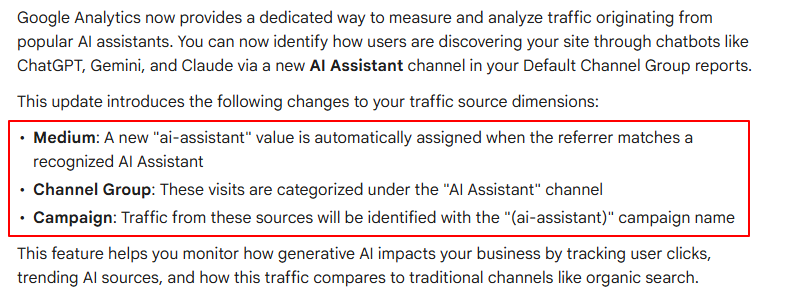
1. The Three Automatic Dimension Changes for AI Referral Tracking
When GA4 detects an incoming click from a recognized generative AI platform, it automatically overwrites three specific traffic source dimensions:
- The New Medium: The visit is assigned a medium of ai-assistant. (This replaces standard mediums like referral or organic).
- The New Channel Group: The session is officially categorized under the “AI Assistant” channel. This now sits right alongside your standard channels like Organic Search, Direct, and Paid Social in your Default Channel Group reports.
- The Campaign Tag: To keep data clean, traffic from these sources is automatically labeled with the reserved (ai-assistant) campaign name.
The best part? You do not need to configure any custom channel groups or write any code. This classification happens automatically .
2. The “Referrer Matching” Logic for AI Platform Source
How does Google know a click came from Claude and not a random blog website? it’s Referrer Headers.
When a user clicks a link inside a web-based chatbot, their browser sends a “referrer header” to your site, telling GA4 where the user just came from. Google maintains an internal, continuously updated list of recognized AI domains.
While Google hasn’t published the entire list, they have officially confirmed it recognizes major players, including:
- ChatGPT (OpenAI)
- Gemini (Google)
- Claude (Anthropic)
If the incoming domain matches their list, GA4 instantly triggers the ai-assistant classification.
3. The “Direct Traffic” Gap (What You Still Can’t See)
While this feature is a massive leap forward, we have to acknowledge a technical reality that is heavily discussed on technical SEO forums: Referrer Stripping.
If a user asks ChatGPT a question via the mobile app (iOS/Android), or through certain desktop native apps, the application often strips away the referrer header for privacy reasons before sending the user to your site.
- What this means: GA4 receives the user but has no idea where they came from.
- The result: This traffic will still be lumped into your Direct channel.
Therefore, when you look at your new “AI Assistant” numbers, treat them as a highly accurate baseline. Your actual AI-driven traffic is likely even higher than what GA4 is able to capture.
How to Track AI Referrals with Google Analytics’ AI Assistant
Now that you understand the logic behind the new ai-assistant classification, it’s time to see it in action.
Since Google has built this natively into the Default Channel Group, you don’t need to configure complex Regex rules or create custom channel groupings from scratch.
Here is the exact workflow to find, filter, and analyze your AI traffic.
Step 1: Navigate to the Traffic Acquisition Report
Your journey starts in the standard acquisition reports, which tell you where your new and returning users are coming from.
- Log in to your Google Analytics 4 property.
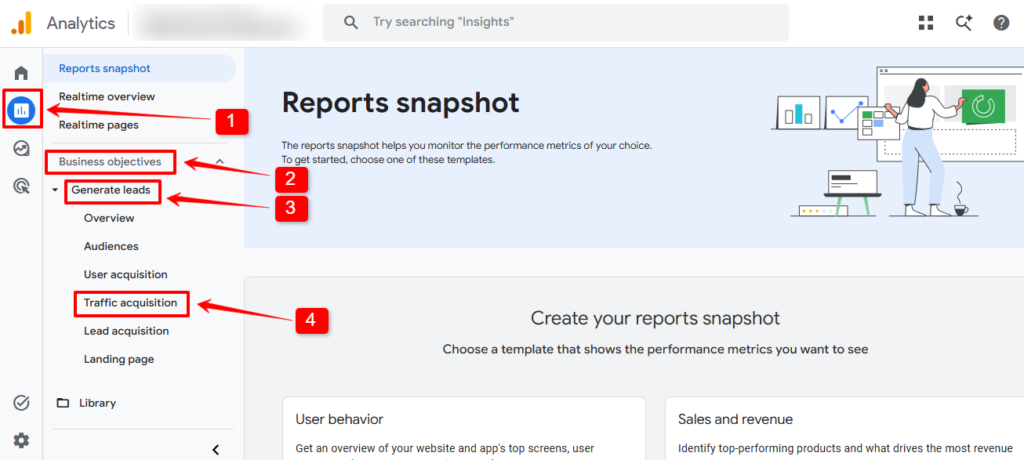
- In the left-hand navigation menu, click on Reports.
- Then, expand the Business Objectives dropdown.
- Afterwards, click on the Generate Leads option to reveal the dropdown, and
- Hit the Traffic acquisition.
That’s it! Now, let’s move on to the next step.
Step 2: Find the “AI Assistant” Default Channel
By default, the primary dimension in the Traffic Acquisition table is set to the Session default channel group.
- Scroll down to the data table below the main charts.
- Look through the list of channels (alongside Organic Search, Direct, and Referral).
- You will now see a dedicated row labeled AI Assistant.
Note: If you do not see it, it simply means you haven’t received measurable traffic from a recognized chatbot in your selected date range.
Step 3: Deep Dive with Secondary Dimensions (Which AI is winning?)
Knowing that you have “AI Assistant” traffic is great, but as a marketer, you need to know which specific bot is citing your website content. Is it ChatGPT, or is it Gemini?
- In the same data table, click the blue “+” (plus icon) next to the “Session default channel group” column header.
- From the dropdown menu, select Traffic source, then click on Session source/medium.
- Now, look at your “AI Assistant” row. You will see it broken down into specific sources. For example, you might see:
- chatgpt.com / ai-assistant
- gemini.google.com / ai-assistant
- claude.ai / ai-assistant
Step 4: Define AI Traffic with Filters
If you want to view your entire dashboard (including landing pages and engagement metrics) only through the lens of AI traffic, you need to apply a report filter.
- At the very top of the Traffic Acquisition page, click the Add filter + button (located under the report title).
- On the right-side panel that opens, set the Dimension to Session default channel group.
- Set the Match Type to exactly matches.
- In the Value dropdown, select AI Assistant.
- Click Apply and all the charts and tables on the page will exclusively show data from users who clicked through from an AI chatbot.
Step 5: Identify Your “Most Cited” Pages
Now that your report is filtered to show only AI traffic (from Step 4), you can find out exactly which blog posts or pages the AI relies on.
- Scroll down to the data table.
- Change the primary dimension (which is currently “Session default channel group”) by clicking the dropdown arrow.
- Select Page / screen -> Landing page + query string.
- The resulting table is pure gold: It is a ranked list of the specific URLs on your site that AI chatbots are actively linking to and driving users toward.
A Quick Note on “Comparisons”
To truly measure AEO success, try using the Add comparison feature at the top of GA4. Create one condition for Session default channel group = AI Assistant and another for Session default channel group = Organic Search.
This will overlay the data, allowing you to see side-by-side if AI users spend more time reading your tutorial blogs than traditional search users.
Why the AI Assistant Measurement Feature is a Game Changer
As most of you know, for months, the SEO community has been locked in a heated debate on Reddit and across social media: Is Google’s AI Overview stealing our traffic? The “Zero-Click” search reality had many marketers feeling like they were playing a game where the score was hidden.
The launch of the native AI Assistant channel in Google Analytics 4 changes the narrative. It’s not just a technical update; it is the first time we can move from speculation to data-driven strategy.
1. Closing the “Attribution Gap”
Before this update, traffic from chatbots like ChatGPT or Claude often arrived at our sites with messy referral data. Sometimes it was crowded into “Direct,” other times it appeared as a standard “Referral,” and occasionally it was lost entirely.
By creating a dedicated Medium (ai-assistant) and Channel Group, Google is finally giving “Answer Engines” their own seat at the table. This allows you to prove to stakeholders that your content isn’t just being “read” by an AI, it’s actually driving qualified users back to your site.
2. The Ultimate KPI for Answer Engine Optimization (AEO)
No more struggles for convincing your clients, now KPI is defined properly.
Previously, you may’ve underrated that your content structure was good enough to cite by AI. But the biggest challenge was to measure the success:
From now, Google Analytics’ new feature is the “Missing Link” for AEO. It allows you to:
- Track Citations: See which blog posts are successfully acting as the “source of truth” for Gemini or ChatGPT.
- Measure Visibility: Quantify how often your brand is the chosen answer for complex, long-tail queries.
- Validate the IEATO Model: It provides the “Outcome” data needed to see if your focus on Intent and Trust is actually resulting in clicks.
3. Distinguishing “High-Intent” AI Users
A major insight from recent Reddit discussions is the difference in user quality. A user who clicks a link within an AI Overview or a chatbot response has already been “pre-sold” by the AI’s summary. They aren’t just browsing; they are looking for deeper expertise or the specific tool that the AI recommended.
With this new feature, you can finally compare:
- Engagement Rate: Do AI-referred users stay longer than organic search users?
- Conversion Rate: Are users coming from ChatGPT more likely to install or download a tool than those from a standard Google search?
The Reality Check: While some “informational” clicks may be lost to the AI’s summary, the clicks you do get from AI assistants are likely higher in intent. This feature allows you to stop mourning the quantity of traffic and start optimizing for the quality of the referral.
4. Fighting “Hallucinations” with Authority
One of the loudest complaints on technology forums is the frequency of AI “hallucinations” or lies. Google knows this is a problem, which is why Gemini and other assistants are increasingly relying on authoritative documentation to “anchor” their answers.
By tracking this traffic, you can see which of your pages are successfully acting as those anchors. If your “How-to” guides for products are getting high AI traffic, it’s a direct signal that the AI trusts your technical accuracy.
Best Practices for Analyzing AI Traffic
Simply seeing the data in GA4 is just the beginning. To truly turn these insights into a competitive advantage for your websites, you need to shift your mindset. You aren’t just measuring “clicks” anymore; you are measuring “Authority Referrals.”
Here are the best practices for interpreting your AI Assistant data to refine your content strategy.
- Prioritize Engagement over Volume: Don’t panic if raw numbers are lower than organic search. AI-referred users are often “pre-sold” by the chatbot summary; focus on Average Engagement Time and Engagement Rate as indicators of high-intent traffic.
- Identify “AI-Preferred” Structures: Analyze your most-cited landing pages to find patterns. If specific H3 formats, bulleted lists, or data tables are winning, replicate that structure across your site to improve “extractability” for LLMs.
- Track “Answer-to-Action” Conversions: Measure how many ai-assistant users reach your “Pricing” or “Download” pages. If traffic is high but conversions are low, your content may be cited for the wrong intent.
- Correlate Freshness with Visibility: Use GA4 annotations to mark when you update a blog post with 2026 data. Watch for a subsequent spike in AI traffic to confirm that “content refreshing” is signaling reliability to AI crawlers.
- Pivot for “Zero-Click” Scenarios: If AI traffic is low for a specific topic, the chatbot might be providing a complete answer on the SERP. Counter this by offering “click-worthy” extras the AI can’t summarize, such as downloadable templates, interactive demos, or proprietary case studies.
Preparing for an AI-First Future
The introduction of the ai-assistant channel in GA4 confirms that we’ve officially entered the Answer Engine era. Success no longer depends solely on standard keyword rankings, but on being the definitive source that AI models trust and cite.
By leveraging this new data, you can move from guessing to a data-driven AEO (Answer Engine Optimization) strategy. Focus on creating structured, authoritative content that provides the “Next Click” value an AI summary can’t replicate. Stop chasing vanity metrics, optimize for the high-intent, high-trust users that AI assistants are now delivering to Wpmet and Wpgutenkit.
The future of search is conversational; make sure your analytics prove you are leading the conversation.
Leave a Reply