
AI shopping assistants are changing how people discover and buy products. Online shoppers are no longer typing keywords or scrolling through product results, instead they are asking direct questions, like: “What’s a good laptop for video editing under $1,500?” or “Do these boots work for wide feet?”
And, AI based agentic commerce is suggesting the best matched products to them within a very short type. Sounds cool!
But, this new buying practice has emerged as a new problem!
The problem? Most e-commerce’s websites’ product catalogs are still built for traditional search engines. They are usually being optimized for keywords, not conversations. You might be doing this for a long time too, for your online shop.
But when an AI agent tries to understand your products, it encounters obstacles. Because I have always seen most online shop owners commonly put product descriptions in a vague way, that misses compatibility info answers that AI agents need to tell their users.
And, to solve this, conversational attributes come in.
Generally, conversational attributes are a new set of structured data fields that you can add to your product feed, which is specifically designed to help AI systems understand. And, AI agents can find logics and reasons to recommend your products in natural language situations.
In this blog, we’ll walk you through what conversational attributes are, why they matter, each one explained in simple words from my experience, and how to start implementing them without disrupting your existing e-commerce setup.
From SEO to GEO: The Shift Retailers Need to Understand
For the past 20 years, e-commerce optimization has been about SEO – Search Engine Optimization. You stuffed the right keywords into titles, wrote meta descriptions, and structured your data for Google’s crawlers.
No worries, that still matters. But something new is happening alongside it.
The agentic commerce is now emerging swiftly. Already, AI Mode passed one billion monthly active users in May 2026 and it’s just one year after its launch. Query volume on AI Mode has been more than doubling every quarter since it launched.
Google’s Shopping Graph, which feeds AI Mode, contains over 60 billion product listings – with more than 2 billion receiving updates every hour. Your products are in that graph. Conversational attributes are how you give the AI enough context to recommend yours over a competitor’s when a shopper asks a specific question.
AI agents don’t work like search engines. They don’t match keywords, rather they look for reasons. A shopper asking “Is this printer compatible with my MacBook Air?” needs an agent which can actually answer that question. Not just find a page that contains those words.
This is where Generative Engine Optimization (GEO) comes in. GEO is about structuring your product data so that AI systems: large language models, shopping agents, conversational assistants can parse, understand, and act on your product catalog.
Let’s take a quick look at the difference in action:
| Traditional SEO | Generative Engine Optimization (GEO) |
|---|---|
| Keywords in titles and descriptions | Structured answers to real questions |
| Metadata for crawlers | Machine-readable context for AI agents |
| Rank higher in search results | Get reasoned about and recommended |
| One-size product data | Rich relational and contextual attributes |
| Click traffic goal | High-intent conversion goal |
In plain words, conversational attributes are the practical tool that bridges the gap between the old model and the new one.
| Do note that: GEO isn’t replacing SEO. Actually, it’s sitting alongside it. You still need to follow the SEO fundamentals. But now you also need to give AI agents the structured context they need to reason about your products with confidence. |
What Are Conversational Attributes?
Conversational attributes are an optional set of structured data fields available in Google Merchant Center’s product data specification. They are designed to complement your existing store’s product data. You don’t need to replace it.
According to Google’s official documentation, these attributes help AI systems and conversational agents better understand the specific nuances of your products. They power AI-driven surfaces like AI Mode in Search, Google’s Gemini shopping experience, and Business Agent.
There are currently six conversational attributes for optimizing your e-commerce store:
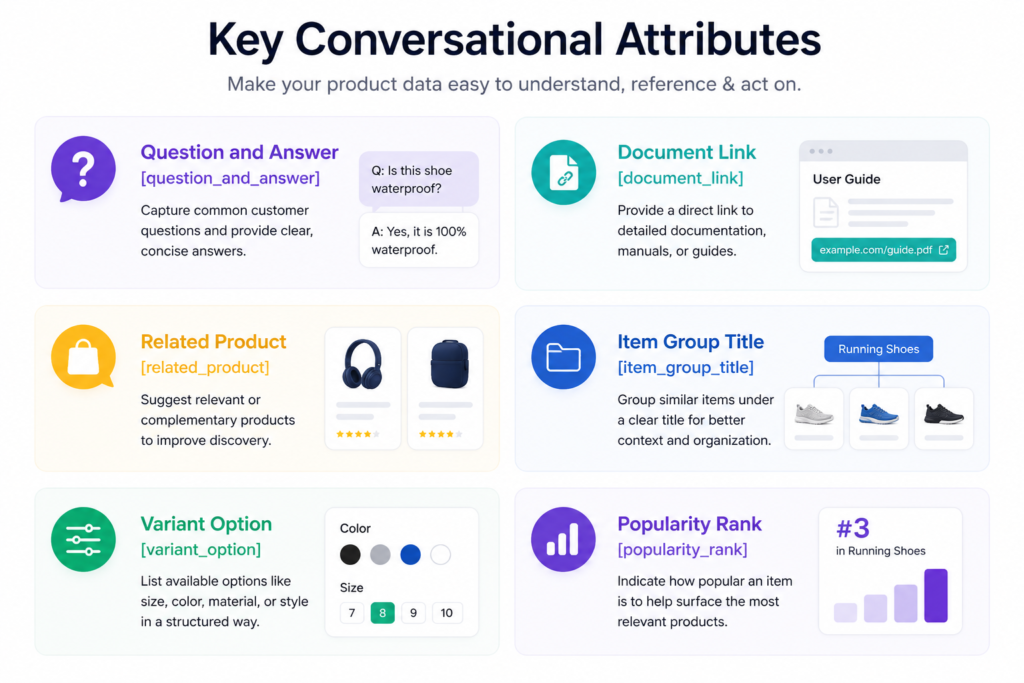
- Question and Answer [question_and_answer]
- Document Link [document_link]
- Related Product [related_product]
- Item Group Title [item_group_title]
- Variant Option [variant_option]
- Popularity Rank [popularity_rank]
But, one thing worth being clear about before going to explain these conversational attributes further: Google does not currently document a direct ranking or visibility benefit from filling in conversational attributes. What Google says is that they help its models “understand product nuance, variants and relationships.”
In practical terms, this means: When you add the right conversation-assisting features to your product, it is able to compete more evenly with AI in the process of generating answers. Products without them rely on the AI inferring context from whatever partial data exists, which means vague answers, or no answer, when a shopper asks a specific question.
The competitive pressure isn’t from a ranking algorithm. It’s from the AI Performance Insights attribute completeness score now visible to you and your competitors in Merchant Center.
The Six Conversational Attributes of AI Shopping Explained
Let’s go through the core six conversational attributes that helps to optimize your online store for agentic ecommerce and AI assistant:
1. Question and Answer [question_and_answer]
As I already said, AI agents need to find answers of its users in your product feed. Therefore, this is probably the most powerful conversational attribute, and the one that has the most direct impact on AI-powered discovery.
Here, the idea is very simple: think about the most common questions shoppers ask about each product, and optimize your product feed outline and descriptions with these answers. When an AI agent is helping a shopper, it can pull those answers without guessing.
| Question and Answer [question_and_answer]: Structured FAQ pairs that help AI agents answer specific product questions during a conversation. Example: Question: Does it have a headphone jack? Answer: This version doesn’t have a headphone jack.” Question: Does it support Bluetooth? Answer: It has full Bluetooth 6.0 support. |
Why does the Question and Answer conversational attributes matter for agentic commerce?
Imagine a shopper asking: “Does this phone have a headphone jack?” Without the Q&A attribute, an AI agent has to guess from the description. With it, the agent has a direct, accurate answer. That’s the difference between a confident recommendation and a vague one.
Good questions to include for helping AI shopping assistant:
- Compatibility questions (“Does this product work with X?”)
- Usage questions (“Can I use this outdoors?” or “Is it machine washable?”)
- Technical spec questions (“How long does the battery last?”)
- Care and maintenance questions (“How do I clean this?”)
- Return and warranty questions (“What’s the return policy?”)
| Quick tip: Start by checking your customer support inbox or live chat logs. The questions shoppers ask your support team are the exact questions to put in your [question_and_answer] feed. First, analyze the user’s questions to understand shoppers’ pain points and then structure the product feed accordingly. |
2. Document Link [document_link]
Some products need more than a description. Think power tools, electronics, appliances, furniture requiring assembly, or anything with a warranty or safety manual. The [document_link] attribute lets you link directly to PDF documents that give AI agents deeper technical context.
| Document Link [document_link] Link to one or more PDF documents (manuals, assembly guides, warranty docs) for AI agents to reference. Example: https://example.com/manual.pdf, https://example.com/assembly_instructions.pdf |
For example, if a shopper asks: “How do I install this?” or “What’s included in the box?”, an agent with access to your assembly guide can pull that information and share it directly. So, there will be no need to redirect the shopper to a separate page to dig through a PDF themselves.
You can submit multiple PDFs separated by a comma. Useful documents to link:
- User manuals
- Assembly or installation instructions
- Warranty documentation
- Safety data sheets
- Size or measurement guides
3. Related Product [related_product]
The [related_product] attribute is what turns your product catalog from a list of individual items into a connected ecosystem. Instead of just listing products, you define the actual relationships between them.
| Related Product [related_product] Defines relationships between products: required parts, accessories, or often-bought-with items. Structured as relationship_type:identifier_type:identifier. Example: required_part:id:AZ7B, accessory:gtin:811571013579, often_bought_with:id:AZ7C |
There are four relationship types you can define to create Product entities:
required_part: An item that is necessary for this product to function. Example: a battery charger that’s sold separately.
accessory: An optional add-on that works with this product. Example: a compatible case for a phone.
substitute: An alternative if the product is out of stock.
often_bought_with: Products that shoppers frequently purchase together. Useful for bundles and cross-sells.
The real power of this attribute is in proactive problem-solving. If a shopper adds a camera body to their cart but hasn’t added a memory card (which is a required_part), the AI agent can flag this before checkout. That saves the customer frustration and saves you a return.
| Real-world example: A PC parts retailer uses [related_product] to map compatible RAM, storage, and cooling accessories to each motherboard. When a shopper builds a cart, the AI agent cross-checks compatibility in real time and flags any mismatched components before the customer clicks Buy. |
4. Item Group Title [item_group_title]
When you sell the same product in multiple variants like different colors, sizes, memory options, or configurations. Then, AI agents need a clear way to understand that these are all versions of the same thing. That’s what [item_group_title] does.
| Item Group Title [item_group_title] Assigns a readable name to a product family that comes in multiple variants. Used together with item_group_id. Example: Organic Cotton Men’s T-Shirt |
Without the [item_group_title] conversational attribute, an AI agent might treat a product’s blue and red versions as completely separate, unrelated items. But, when you will apply it to your ecommerce store, the agent understands: these are the same T-shirt, just in different colors and it can present the options to the shopper cleanly.
Also, use [item_group_title] in combination with the existing [item_group_id] attribute in your product feed. In this way, the title gives humans and AI a readable label; the ID creates the machine-level grouping.
5. Variant Option [variant_option]
This conversational attribute pairs directly with [item_group_title] to spell out exactly what makes each variant different. Instead of hoping an agent can infer that one product is “size Large” and another is “size XL”, you state it explicitly in a machine-readable format.
| Variant Option [variant_option]Specifies all variant-identifying properties for a product. Structured as name:value pairs. Example: display:XL,memory:512GB,color:moonstone | Shoe width:narrow,size:8 |
This is especially important for technically complex products. Like:
- For a smartphone, the variant might be defined by display size, memory, and color.
- For footwear, it might be width, size, and material.
- For SaaS products, it might be the tier and the number of users.
When you apply both [item_group_title] and [variant_option], an AI agent can confidently tell a shopper: “The 512GB model in Moonstone is in stock for $995. The 256GB version is available in three colors.” That’s a useful, specific answer, not a vague one.
6. Popularity Rank [popularity_rank]
The [popularity_rank] attribute gives AI agents a signal about how well a product is performing relative to your other inventory. It’s expressed as a percentage of your total inventory and AI agents understand it like the higher the number, the better the product is selling.
| Popularity Rank [popularity_rank] indicates how popular a product is compared to your other products. Higher value = better performer. Expressed as a percentage of total inventory. Example: 95.5 (meaning this product is in the top 4.5% of your catalog by performance) |
How does the [popularity_rank] attribute help your e-commerce store?
When an AI agent tries to recommend a product, especially if multiple options seem equally suitable, the popularity rank serves as a decisive signal. The agent may consider that this product is your best-selling product, not just one of many options.
It also adds a layer of social proof to AI recommendations. A recommendation of “one of their most popular items” carries more weight than a generic suggestion.
How to Measure Whether Your Conversational Attributes Are Working
Google launched AI Performance Insights in Merchant Center in May 2026, with a pilot beginning in US accounts in July 2026. A broader rollout to Australia, Canada, India, and New Zealand is planned.
The good thing is that, this tool sits inside the same Merchant Center console you already use. It gives you three things that weren’t previously available:
First, a share of voice benchmark. You can see how your brand performs on AI Mode, AI Overviews, and Gemini compared to similar brands in your category. This is the first time Google has made AI-surface visibility directly measurable for merchants.
Second, a product attribute completeness score. Google scores how fully your product attributes are filled in – including conversational attributes. A lower score means your products compete at a disadvantage when AI responses are assembled. A competitor with complete attributes gets the recommendation. You don’t.
And, the third one is “actionable suggestions“. The tool surfaces specific product feed updates you can make to better match what shoppers are actually asking on AI surfaces.
Now, I want to clarify two things, that you should be aware about: Google is explicit that conversational attributes don’t directly improve ranking. What they do is make your products more legible to the AI models that generate recommendations. And the attribute completeness score is what turns that into a competitive signal you can actually track and act on.
So, if you are from USA, check Merchant Center for access for these three things – US accounts are in pilot now. Other markets follow in the coming months.
What Your Product Feed Needs for AI-Powered Discovery
Conversational attributes are the new layer for optimizing your online shop for agentic search. But they sit on top of solid foundational data. AI agents need both to function properly. Here’s a breakdown of everything your feed should contain.
The New Conversational Layer
This is what we’ve just covered above. The six attributes that enable natural language reasoning:
- [question_and_answer] – direct answers to common questions
- [document_link] -PDFs for technical depth
- [related_product] -product relationships and compatibility
- [item_group_title] + [variant_option] -clean variant navigation
- [popularity_rank] -performance signal for recommendations
The Non-Negotiable Fundamentals
These aren’t new but they’re just as critical. AI agents can’t function if your ecommerce website’s foundational data is unreliable.
Real-time availability. An agent recommending an out-of-stock product is useless. Your inventory sync needs to be frequent. Try to update in real-time or at least several times per day.
Accurate pricing. Price consistency between your feed and your website is essential. When AI Agents filter by budget, then a mismatch breaks the experience at checkout.
High-quality images. Multimodal AI agents (like those in Gemini) can visually process product images. Blurry, mismatched, or missing images reduce your chances of being recommended.
GTINs, MPNs, and Brand. These unique identifiers are how agents confirm they’re looking at the exact right product. Missing GTINs reduce visibility, especially for branded goods.
Shipping and fulfillment data. When a shopper asks, “Will this arrive by Friday?”, the agent needs your dispatch times, carrier options, and delivery windows to answer accurately.
Contextual Business Data
To fully enable the journey from discovery to transaction, there’s one more layer to consider:
Loyalty programs and member pricing. If you have a rewards program, exposing this data lets AI agents proactively tell shoppers they’re earning points or unlocking a members-only discount.
Direct AI Mode offers. Advertisers can set up exclusive discounts specifically for AI Mode users. Shoppers who are actively in a high-intent buying session. This is a growing lever for capturing AI-driven conversions.
| The full picture: Think of your product data in three layers: (1) Core fundamentals: availability, price, images, identifiers. (2) Conversational attributes: Q&A, relationships, variants. (3) Business context: loyalty, offers, shipping. All three together make your catalog truly AI-ready. |
How to Implement Conversational Attributes to Optimize E-Commerce Stores for AI Assistants
One good thing is that you don’t need to rebuild your entire product feed to add conversational attributes. Google has designed these to be additive. You just need to layer them on top of your existing setup.
Use a Supplemental Data Source (Recommended)
Google strongly recommends adding conversational attributes via a supplemental data source rather than editing your primary feed. Here’s why this is the smarter approach:
- Your primary feed stays untouched, no risk of breaking existing approvals
- You can test and iterate on conversational data independently
- Your team can manage the supplemental feed without touching core product operations
- Adding conversational attributes this way will not affect your current products’ approval status
A supplemental feed essentially “decorates” your existing catalog with the new agentic context. Think of it as a separate layer of data that enriches each product without replacing anything.
Use the Merchant API for Large Catalogs
If you have thousands of products or a complex and frequently changing catalog, manually managing a supplemental feed will quickly become unmanageable. In that case, the Merchant API is the right tool.
The Merchant API lets you programmatically submit and update conversational attributes at the speed your catalog actually changes. This is especially important for attributes like [question_and_answer] that may need to be updated as products evolve, or [popularity_rank] that changes over time.
Don’t Duplicate Data You Already Have
One common mistake: adding conversational attributes that repeat information already in your existing fields. Google is explicit about this, if you’ve already included specific details in your [description], [product_highlight], or [product_detail] attributes, you don’t need to duplicate them in conversational attributes.
Use conversational attributes to add genuinely new information, like structured Q&A, document links, product relationships, and variant clarity. Not to restate what’s already there.
Implementation order of Conversational Attributes:
- Start with [question_and_answer] – it has the biggest impact on AI conversations.
- Then add [related_product] for your most complex product families.
- Then [item_group_title] and [variant_option] for anything with multiple variants. [document_link] and [popularity_rank] can follow once the first three are in place.
Ask Advisor – Your AI Collaborator Inside Merchant Center
Google announced Ask Advisor as part of the May 2026 Merchant Center updates. It’s an AI tool built directly into Merchant Center that you can use to troubleshoot feed issues, get tailored optimization suggestions, and identify what’s holding your products back on AI surfaces.
For conversational attributes specifically, Ask Advisor can help you identify which products have incomplete attributes, what attributes would have the most impact for your category, and which feed errors are affecting your AI visibility.
Think of it as an AI assistant for managing your AI readiness. You ask it questions in plain language and it surfaces specific actionable fixes. It’s available directly inside Merchant Center, no third-party tool required.
What Conversational Attributes Actually Does for Your Business
Here’s the business case in plain terms:
Higher-Intent Traffic
Early data from retailers, including Wayfair, shows that traffic arriving through AI-powered agentic channels tends to have higher purchase intent than traffic from traditional browsing. The AI agent has already done the filtering, the shopper arrives having already established they want what you’re selling.
Yes, bounce rates can be higher in some cases because agents help shoppers quickly rule out poor matches. But the traffic that does land converts at a better rate. Conversational attributes help make sure your products are the ones making it through the filter.
Collapsing the Research Phase
One of the main reasons shoppers abandon carts is that they still have unanswered questions. “Does this work with my existing setup?” “What’s the return window?” “Is there a warranty?”
When those answers are in your [question_and_answer] feed, an AI agent can resolve those questions during the discovery conversation, before the shopper even reaches your product page. That means fewer abandonments and more confident purchases.
Preventing Pre-Checkout Problems
The [related_product] attribute with required_part relationships is especially valuable here. If a shopper is building a cart and inadvertently misses a required accessory, like a charger, a battery, a necessary cable, etc. The AI agent can catch that proactively and prompt them to add it. That’s a better experience for the shopper and fewer frustrated post-purchase returns for you.
Supporting Your Brand Voice on Third-Party Surfaces
When your products are being recommended and described by an AI agent on a Google surface or another platform, that agent is drawing on your data. Conversational attributes are what give your products a consistent, accurate voice even when you’re not the one doing the talking.
They also serve as grounding data for your Business Agent. A virtual sales associate that uses your catalog data to answer questions in your brand’s tone of voice. The richer your data, the better your Business Agent represents your brand.
A Real Product Feed Example with Conversational Attributes
Google’s own documentation shows what a fully conversational-attribute-enriched product listing looks like. Here’s a condensed version based on the Merchant Center example, and the product here is Google Pixel 9:
| Attribute | Value |
|---|---|
| item_group_title | Google Pixel 9 |
| variant_option | display:XL, memory:512GB, color:Moonstone |
| question_and_answer | “Does it have a headphone jack?”: “No.” | “Does it support Bluetooth?”: “Yes, Bluetooth 6.0” |
| related_product | often_bought_with:id:AZ7B (case), accessory:gtin:811571013579 (charger) |
| popularity_rank | 95.5 |
| document_link | example.com/manual_pixel9.pdf |
| availability | in_stock |
| price | 995.00 USD |
| gtin | 840353925693 |
When all of these attributes are in place, an AI agent helping a shopper compare phones has everything it needs: variant clarity, Q&A answers, compatible accessories, a popularity signal, and a link to the manual, all without leaving the product data layer.
Common Mistakes to Avoid
Skipping Q&A because descriptions seem “detailed enough”. Descriptions are for humans to read. Q&A is for AI agents to query. They serve different purposes, even if the information overlaps.
Leaving [related_product] empty for complex product families. If your products have compatible accessories, required parts, or natural bundles, and you don’t define those relationships, agents will miss the connection entirely.
Not keeping conversational attributes up to date. Attributes like [popularity_rank] and [question_and_answer] can go stale quickly. Build a review cadence at a minimum, quarterly, monthly for fast-moving categories.
Adding these attributes to your primary feed and risking approval disruption. Always use a supplemental data source when starting out. That’s the safe path.
Duplicating data from [description] or [product_detail]. Google’s guidance is clear: don’t repeat yourself. Use conversational attributes to add net-new context.
The 30-Second Test: Is Your Catalog AI-Ready Right Now?
Open ChatGPT or Gemini. Type: “Tell me about [your product name] by [your brand name].“
Read the response. Is it specific and accurate, naming real features, correct specs, current pricing? Or is it vague, generic, or could it describe any competitor in your category?
If the response is vague, your structured data isn’t coherent enough for AI agents to work from. They’re filling in gaps with averaged-out information from across the web. That’s what “AI sameness” looks like, your product described in terms that apply to everyone and stand out for no one.
Run this test on your top 10 products. Note which ones return specific, accurate responses and which return generic ones. That gap is your optimization priority list.
FAQs on Conversational Attributes
What are conversational attributes in Google Merchant Center?
Are conversational attributes required?
Will adding conversational attributes affect my existing product approvals?
What’s the best conversational attribute to start with?
How do I know what questions to put in [question_and_answer]?
How often should I update conversational attributes?
What’s the difference between [item_group_title] and the existing [item_group_id]?
Do I need a developer to implement conversational attributes?
How do conversational attributes affect my conversion rate?
Can conversational attributes help with cross-selling and upselling?
What is a Business Agent, and how do conversational attributes affect it?
What’s the difference between traditional product SEO and GEO?
Final Thoughts
The way people find and buy products is changing faster than any previous shift in e-commerce. AI agents are becoming the interface between shoppers and retailers, and your product data is how you communicate with them.
Conversational attributes are the practical, implementable step that puts your catalog on the right side of that shift. They’re optional today, but the retailers who adopt them early will have a meaningful head start when AI-powered shopping becomes the default.
The good news: you don’t need to rebuild your entire operation. Start with a supplemental feed. Pick your best-selling products. Add Q&A answers from your support inbox. Define your product relationships. Name your variants clearly.
Build from there — and your catalog will be ready to have real conversations with shoppers, even when you’re not in the room.
Leave a Reply