What Are Image Alt Text Guidelines and Why Do They Matter?
Every image on your website has a hidden layer that most visitors never see. It’s the alt text: a short description written into the image’s HTML code. When someone using a screen reader visits your page, that’s what they hear instead of seeing the image. When Google crawls your site, that’s one of the primary signals it uses to understand what your images show.
Alt text isn’t a technicality. It’s the bridge between your visual content and everyone who can’t access it the way a sighted user can. That includes visually impaired users, people on slow connections where images fail to load, and search engines that still can’t see images the way humans do.
Google’s Search Central documentation puts it directly: “When writing alt text, focus on creating useful, information-rich content that uses keywords appropriately and is in context of the content of the page.”
That single sentence contains the whole picture. Useful. Informative. Contextual. Keywords that fit naturally. In this guide, I will discuss exactly what that means in practice. With practical perspectives like, for accessibility, for SEO, for e-commerce, and for every type of image you’ll encounter on a website.
The Core Principle: Functional Equivalent
Before getting into specific rules, it helps to understand the underlying idea behind all alt text guidelines.
Alt text should be the “functional equivalent” of the image. That means if the image disappeared entirely from the page, a person reading the alt text should end up with the same understanding a sighted person would get from seeing the image.
This sounds simple, but it has real implications for how you write.
A photo of a bird in a general nature article might only need the species name: “Red-tailed hawk in flight.” But if that same photo appears in an article specifically about how birds survive winter, the alt text should address what the image shows in that context: “Red-tailed hawk with feathers fluffed up against cold weather.”
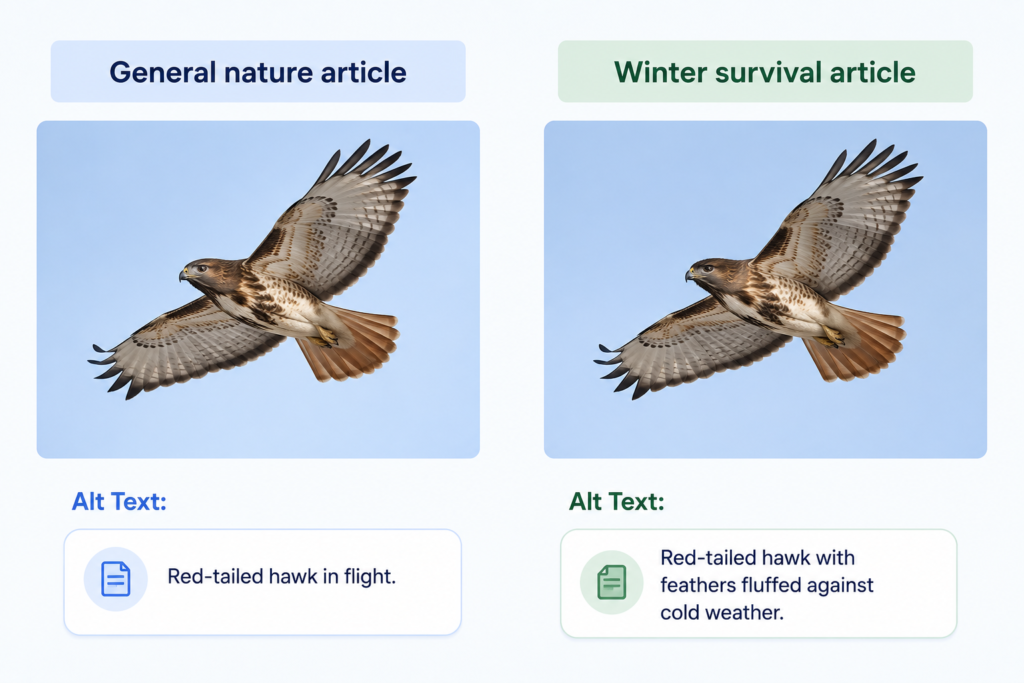
Same photo. Completely different alt text. Because the context changed.
This is the most important thing to understand about image alt text guidelines: the right alt text depends on why the image is on the page, not just what’s in the image.
How to Write Effective Alt Text: The Core Rules
Keep it concise
Most screen readers stop reading alt text after around 125 characters. Some guidelines suggest aiming for 10 words or fewer. The goal is to give the reader what they need without slowing them down.
A good test: read the alt text aloud. If it sounds like a sentence someone would naturally say to describe the image, it’s probably the right length. If it sounds like a paragraph, it’s too long.
Describe function, not appearance
The most common mistake people make is describing what an image looks like rather than what it does or means on the page.
If an image of a laptop appears on a page about remote work software, the relevant information isn’t “silver laptop on a desk.” It’s “Remote team using project management dashboard on laptop.” The visual detail is secondary. The meaning is primary.
Use punctuation correctly
When writing image alt text, make sure you’re ending with a period. This isn’t just a grammar rule. Screen readers use punctuation to determine when to pause. A period at the end of alt text tells the screen reader to pause before moving on to the next element. Without it, the alt text and the surrounding text can run together auditorily, making the experience confusing.
Capitalize the first word, as you would a normal sentence. Avoid writing in ALL CAPS, because screen readers sometimes interpret all-caps text as acronyms and read each letter individually, which is disruptive and unhelpful.
Skip “image of” and “photo of”
Screen readers already announce that an element is an image. Starting alt text with “Image of a dog” means the user hears “Image, image of a dog.” The redundancy is unnecessary. Start with the description directly.
Include keywords naturally
Alt text is a meaningful SEO signal. Google uses it alongside its computer vision algorithms and the surrounding page content to understand what an image shows and how it relates to the page topic.
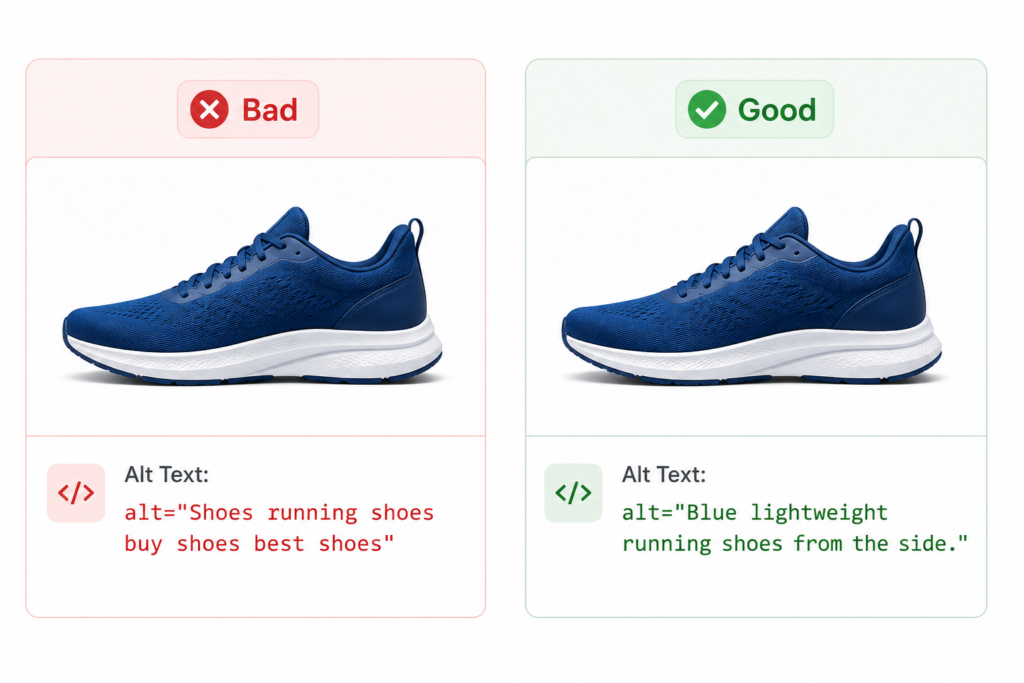
That doesn’t mean forcing keywords in. It means writing an accurate, contextual description that naturally contains the words a person would use to search for that image. If you’re writing alt text for a product photo of blue running shoes, “Blue lightweight running shoes from the side” is both descriptive and keyword-relevant. “Shoes running shoes buy shoes best shoes” is keyword stuffing, and Google treats it as spam.
The test is simple: would a person naturally say this to describe what they see? If yes, it’s good alt text. If it sounds like a list of search terms, it needs to be rewritten.
Alt Text Guidelines for Specific Image Types
Different images call for different approaches. Here’s how to handle the most common types.
Decorative images
Some images exist purely to make a page look better. Dividers, background patterns, abstract shapes, and generic stock photos that add no information to the article they appear on. These images should have an empty alt attribute: alt=””.
This isn’t the same as leaving the alt attribute out entirely. When the alt attribute is missing completely, screen readers read the image filename aloud, something like “IMG00023.JPG“, which is useless and disruptive for the user. An empty alt attribute explicitly tells assistive technology to skip the image, which is exactly the right behavior for something decorative.
If you’re not sure whether an image is decorative, ask yourself: if this image were removed, would the reader miss any information? If the answer is no, it’s decorative.
Complex images: charts, graphs, flowcharts, and maps
Complex images present a unique challenge because they contain more information than can fit in a 125-character description. A flowchart showing a ten-step software development process, a bar chart comparing five years of sales data, or a map showing regional distribution. None of these can be adequately described in a sentence.
The right approach for complex images is a two-part strategy.
The alt text provides a short, high-level summary that tells the user what the image shows and points them toward the full explanation. For example: “A flowchart showing the software development lifecycle; see the Process Phases section for a detailed description.”
The full explanation lives in the page body – a data table for charts, a step-by-step breakdown for flowcharts, or a descriptive paragraph for maps. This way, all users have access to the information, whether or not they can see the image.
Avoid using the longdesc attribute for this purpose. It’s considered obsolete and most modern screen readers don’t support it well. Stick to visible body text or a clearly labeled linked section.
Images used as links
When an image is wrapped in a link tag, the alt text functions as the anchor text for that link. This changes what the alt text should say.
Instead of describing the image, describe where the link goes or what it does. A company logo that links to the homepage should say “WebAshes homepage,” not “WebAshes logo.” A product photo that links to a product page should say something like “View Winter Jacket for Men,” not “Winter Jacket.”
This matters for both accessibility (screen reader users need to know where a link takes them) and SEO (Google uses anchor text to understand the linked page’s topic, and image alt text works the same way for image links).
Images containing text
Search engines and translation tools can’t read text that’s embedded inside an image file. If an image has a heading, a slogan, a price, or any other important text as part of the visual, that text must be included in the alt text.
This is also an accessibility issue. A promotional banner that says “50% off all clothing times this weekend” but has no alt text means screen reader users miss the offer entirely. The alt text should include the text from the image: “Promotional banner: 50% off all clothing items this weekend.“
The best long-term approach is to avoid embedding important text in images at all. HTML text is searchable, translatable, and selectable. Image text is none of those things.
Non-informative avatars and headshots
In specific contexts, such as a speaker lineup on a conference page or a team grid where every person is named in visible text next to their photo, headshots may not need descriptive alt text. If the person’s name and role are already clearly displayed next to their photo, the image isn’t adding informational value that the text doesn’t already provide.
In these cases, alt=”” is appropriate. The exception is when the image itself carries meaning beyond identity – a photo showing someone demonstrating a technique, reacting emotionally, or performing an action that’s relevant to the page content should have descriptive alt text.
Alt Text vs Title Text: Understanding the Difference
These two attributes are often confused, and some CMS platforms place them next to each other, which doesn’t help.
Alt text is for search engines and screen readers. It’s the functional substitute for the image when the image can’t be seen. It’s critical for SEO and mandatory for accessibility compliance under standards like WCAG 2.1 and the European Accessibility Act.
Title text is a tooltip. It shows up when a sighted user hovers their mouse over an image on desktop. It’s not read consistently by all screen readers, it has minimal SEO value, and it’s entirely optional.
The practical takeaway: write descriptive alt text for every meaningful image. Use title text only if it genuinely adds something that helps the user, like “Click to download the full report” on a document preview image.
Don’t copy and paste the same text into both fields. If they say the same thing, the title attribute adds no value and may actually create a redundant experience for some screen reader users. If you use both, make them serve different purposes.
Image Alt Text Guidelines for E-Commerce
E-commerce product images have specific requirements that go beyond general alt text principles. Getting them right affects search visibility, Google Shopping appearance, and the shopping experience for users who rely on assistive technology.
Write alt text that describes the product as seen in the image
Each product image shows the product from a different angle or in a different context. The alt text should reflect what’s actually visible in that specific photo, not just the product name repeated across every image.
For a pair of running shoes with four product photos:
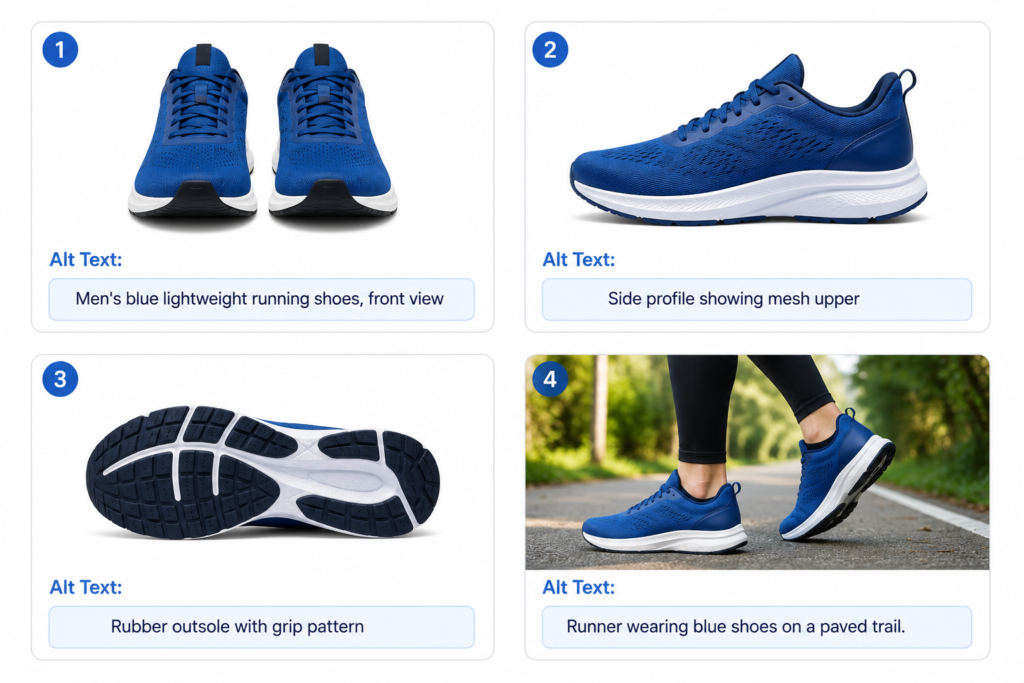
Photo 1 (front view): “Men’s blue lightweight running shoes, front view” Photo 2 (side view): “Men’s blue lightweight running shoes, side profile showing mesh upper” Photo 3 (sole): “Running shoe rubber outsole with grip pattern” Photo 4 (lifestyle): “Runner wearing blue athletic shoes on a paved trail”
Each description is distinct because each image shows something different. This approach gives Google more context about the product and gives screen reader users a complete picture of what they’re considering buying.
Include product attributes that matter to buyers
Think about the questions customers typically have when evaluating a product visually. Color, material, style, fit, size context, key features. These details belong in alt text for product images because they’re exactly what a sighted user notices when they look at the photo.
For an e-commerce site selling clothing, “Navy blue slim-fit chino trousers with belt loops, front view” is significantly more useful than “Blue trousers” – both for a user who can’t see the image and for Google trying to match the product to relevant search queries.
Don’t repeat the same alt text across all product variants
If a product comes in five colors and each color has its own product image, each image needs its own alt text reflecting the color shown. Using identical alt text across variant images tells Google and screen readers nothing about what makes each image different.
Lifestyle and context images need descriptive alt text too
Many e-commerce pages include lifestyle photography – the product in use, worn by a model, or shown in an environment. These images often get neglected in alt text practice because they’re not the “main” product shot. But they’re still images, and they still need descriptions.
For a lifestyle image of someone using a standing desk, “Person working at an adjustable standing desk in a home office setting” gives context that the pure product shot doesn’t. That context is valuable for both accessibility and for appearing in relevant image searches.
Alt text and Google Shopping
Google uses image alt text along with product title, description, and structured data to understand product images for Google Shopping and Google Images. For e-commerce sites, well-optimized product image alt text is directly tied to visibility in visual search results. A product with missing or generic alt text on its images is at a disadvantage compared to a competitor whose images are fully described.
How to Improve SEO with Effective Alt Text
Alt text is one of the most accessible SEO improvements available. It requires no technical setup, no plugins, and no developer involvement in most CMS platforms. It just requires attention and consistency.
Here’s how to approach it strategically.
Start with your highest-traffic pages. Check Search Console’s image search filter to see which pages already generate image impressions. Those pages have images that Google is already trying to understand; better alt text there gives the most immediate lift.
Prioritize product images over decorative images. Commercial intent images drive conversions. A product image without alt text is a missed opportunity in Google Images and Google Shopping. A decorative divider without alt text is just correct practice.
Be consistent with repeated images. If a logo, icon, or badge appears across multiple pages, use the same alt text each time. Inconsistent descriptions for the same image create conflicting signals for search engines.
Don’t treat alt text as an afterthought. The best time to write alt text is when the image is first uploaded. If that becomes a habit, the backlog of unoptimized images stops growing.
Audit existing images periodically. Tools like Chrome DevTools’ Lighthouse accessibility audit flag images with missing alt attributes. Running this audit on key pages every few months keeps the standard from slipping.
Web Accessibility Compliance and Alt Text
Alt text isn’t just a best practice. In many contexts, it’s a legal requirement.
The Web Content Accessibility Guidelines (WCAG) 2.1 Level AA require that all meaningful images have text alternatives. This standard is referenced by accessibility laws in many countries, including the Americans with Disabilities Act (ADA) in the United States, Section 508 for federal websites, and the European Accessibility Act (EAA), which has been in effect since June 2025.
For businesses with websites, accessibility compliance increasingly means legal exposure if it’s ignored. Courts in the United States have consistently ruled that websites are subject to ADA requirements, and cases involving inaccessible image content have resulted in settlements and legal costs that far exceed the time investment of writing good alt text.
The WCAG requirements for images are clear. Meaningful images need descriptive text alternatives. Decorative images need empty alt attributes. Images of text need the text included in the alt attribute. Complex images need both a brief alt text summary and a longer description available in the page content.
Following these guidelines isn’t just about compliance. It’s about making sure every visitor to the site, regardless of how they access it, gets the same information and experience.
What the Limits of AI-Generated Alt Text Actually Are
AI tools have made it easier to generate alt text at scale, especially for sites with large image libraries. But they have real limitations worth understanding before relying on them.
AI analyzes the pixel content of an image. It can describe what’s visible – a person, a product, a setting. What it can’t do is understand why the image is on the page or what role it plays in the surrounding content.
The same image of a person working at a laptop could appear on a page about remote work productivity, a page about back pain from desk jobs, or a page about a specific software product. The right alt text is different in each case. AI doesn’t know which page it’s on or what the image is meant to communicate.
AI-generated descriptions are also prone to being either too vague (“a man sitting at a desk”) or too literal (describing every visual detail without capturing the image’s meaning). They can reflect biases in how they describe people’s appearance. And they sometimes misidentify objects, which produces alt text that’s worse than no alt text at all, because it actively misleads.
Use AI as a drafting tool. Let it generate a starting description, then review it in the context of the page and edit it to reflect what the image actually means there. That review step is not optional. Human judgment is what makes alt text functional.
Frequently Asked Questions
What are the Google Search Central image alt text guidelines?
How do you write effective alt text for product images on an online store?
What are the best practices for alt text in web accessibility compliance?
How does alt text improve SEO?
What is the difference between alt text and title text for images?
Should I use AI to write alt text for all my images?
When should alt text be left empty?
How long should alt text be?
The Bottom Line
Good alt text isn’t complicated. It’s a description that tells anyone who can’t see the image exactly what they need to know, written in the context of the page it’s on.
The image alt text guidelines from Google Search Central, WCAG, and accessibility standards around the world all point in the same direction: describe the image accurately, match the description to its purpose on the page, include relevant keywords naturally, use empty alt text for decorative images, and never leave the alt attribute out entirely.
For e-commerce sites, thorough product image alt text is one of the highest-ROI SEO investments available. For any website, accessible alt text is increasingly a legal requirement, not just a recommendation.
The most effective approach is to make it a habit at the point of upload — writing alt text when an image goes into the media library, before it ever appears on a page. That one habit, applied consistently, eliminates the backlog and keeps every new image properly described from the start.
Leave a Reply