
What Is a Google Featured Snippet?
If you’ve ever searched for something on Google and found the answer at the very top of the page, before any blue links, you’ve seen a featured snippet.
Instead of having to go to a website and read the entire page to find the required sentence yourself, Google automatically collects the answer and displays it in various formats, such as a few sentences or paragraphs, lists, or tables.
In such occasions, Google selects specific parts of a website and displays them directly on the search results page.
That placement is called position zero. It sits above the first organic result, sometimes even above paid ads, and it’s one of the most valuable spots in all of search.
What a classic featured snippet looks like
In its original form, a featured snippet had a few consistent elements:
- A box at the top of the SERP (search engine results page)
- A direct answer pulled from one specific webpage
- The URL and page title of the source are shown below the answer
- Sometimes an image is pulled from the same page
The answer itself could take different shapes depending on the query, like a short paragraph, a numbered list of steps, a comparison table, or a bulleted list of items. I’ll look at each of those formats with real screenshots in the next section.
Why Google show a featured snippet?
Google doesn’t show a featured snippet for every search. It tends to appear when:
- The query is phrased as a question (“what is,” “how to,” “why does”)
- A clear, structured answer exists on a page that already ranks in the top 10
- The answer can be meaningfully summarized in a short block of text, a list, or a table
The key insight here: Google doesn’t give you the featured snippet because you asked for it. It gives you the snippet because your content is already structured in a way that makes the answer easy to extract.
One source, clearly attributed
This is what separates a classic featured snippet from what Google shows today. A featured snippet always pointed to one specific page. If your page earned it, your URL appeared in the box. Readers could see exactly where the answer came from, and one click took them directly to your page.
That single-source attribution is also what made featured snippets so valuable for organic traffic and so competitive.
How featured snippets fit into search today
Before showing you some feature snippet examples, I want to show you something. Here’s where it gets interesting, and where a lot of confusion starts.
If you search most informational queries on Google right now, you probably won’t see the classic featured snippet box. What you’ll see instead is an AI Overview – a longer, generative answer that cites multiple sources rather than pulling from just one.
However, this doesn’t mean featured snippets are gone. They still appear for certain query types, particularly navigational and local queries. However, in cases where ‘featured snippets’ were most common in search results for board information, such as “what is,” “how to,” or “types of”, now AI Overview has now essentially taken over that ‘position zero‘ or top spot.
Up next, I’ll look at exactly how that happened and what it means for your content. But first, let’s look at the real examples.
Featured Snippet Examples – Every Type, With Real Screenshots
Let’s see the example where featured snippets get concrete. Below, you are going to see what types feature snippets Google has historically shown and still display in various forms today, along with real screenshots from live Google searches.
Do note that: you’ll notice something on almost every screenshot: an AI Overview sits where the classic snippet box used to be. That’s intentional from my side. I’ll explain why in the next section. For now, focus on the format, because the content structure that earns each type hasn’t changed.
1. Paragraph Featured Snippet Example
What it is: A short block of text that usually consists of 40 to 60 words that directly answers a “what is” or “why does” question. It’s the most common featured snippet format and the one most people picture when they hear the term.
What triggers it: Definition queries, explanatory questions, or anything starting with “what is,” “what does,” “why is,” or “who is.”
Real example query: what is science fiction
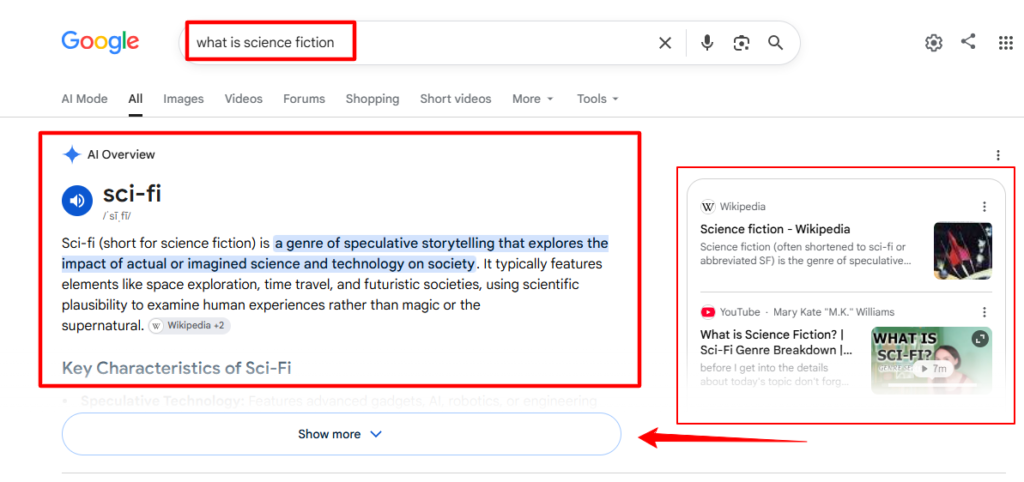
What you’re seeing: Google pulled a clean definition and placed it at the very top of the results. Notice the pronunciation guide and the term “sci-fi” displayed prominently. This is how Google now handles definition queries, blending dictionary-style formatting with its AI Overview layer. The Wikipedia citation appears below the highlighted text.
What the content looks like underneath: The source page has a clear, standalone definition paragraph near the top, not buried inside a long introduction. The answer is self-contained. You could read it without any surrounding context and still fully understand it.
2. Answer Box (Direct / Instant Answer) Snippet Example
What it is: The most minimal form of featured snippet. A single fact, number, or short phrase. Even, sometimes you may see just one sentence and that answers a closed factual question.
What triggers it: Specific factual queries with a single correct answer: counts, dates, measurements, conversions, or named facts.
Real example query: how many bones in the human body
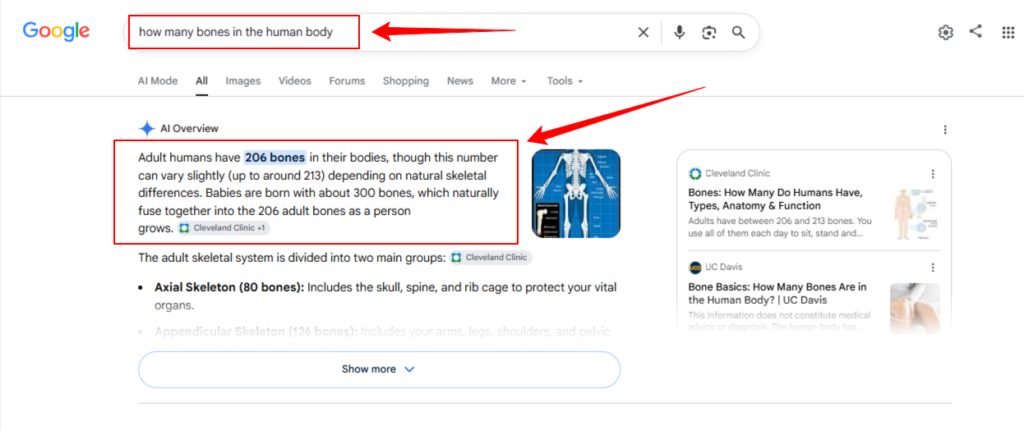
What you’re seeing: The number 206 is bolded and placed at the very front of the answer. if you look at this, featured snippet example, Google isn’t just showing the fact, but also it’s anticipating the natural follow-up (“but why do babies have more?“) and addressing it in the same block. Cleveland Clinic is cited as the primary source, with a second source referenced.
What the content looks like underneath: The source page states the answer clearly in the first sentence of the relevant section – not in a heading, not buried in paragraph three. The number appears before any qualifying context. This is a cleaver move, because this is exactly where the Google extracts first.
3. Bulleted List Snippet Example
What it is: An unordered list of items pulled from a page. Google uses this format when the query implies multiple distinct answers that don’t need to be in a specific order.
What triggers it: Queries asking for types, symptoms, causes, benefits, examples, or characteristics- anything where the answer is a collection of items rather than a sequence of steps.
Real example query: symptoms of vitamin D deficiency
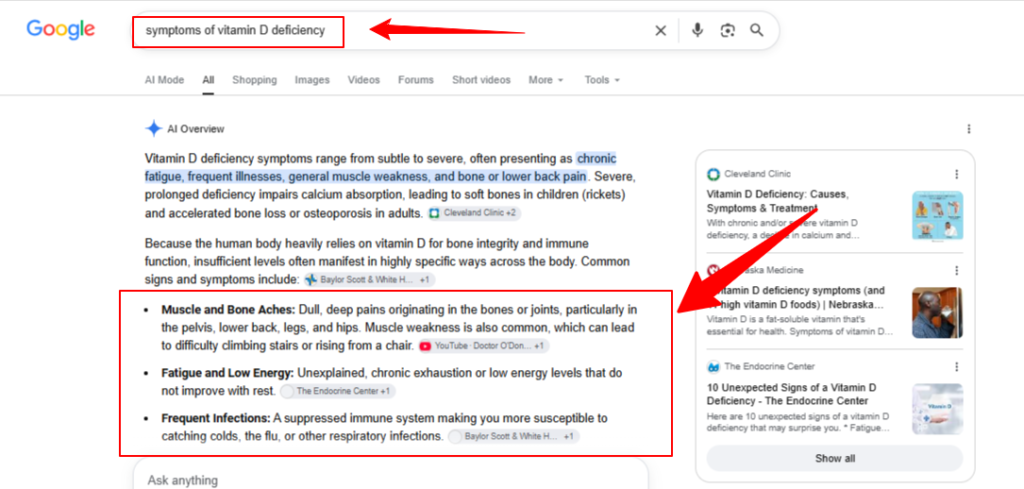
What you’re seeing: Google shows a short introductory paragraph first, then breaks into a bulleted list where each item has a bold label (“Muscle and Bone Aches”) followed by a fuller explanation. Multiple sources are cited, a signal that this is AI Overview behavior rather than a classic single-source snippet.
What the content looks like underneath: The ranking pages for this query use subheadings or bold labels for each symptom, followed by a one- to two-sentence explanation. That structure label first, explanation second is exactly what Google extracts for the bulleted format.
4. Numbered List / How-To Snippet Example
What it is: This type of feature snippet consists of an ordered list of steps pulled from instructional content. Unlike the bulleted list, order matters here, like step 3 can’t come before step 2.
What triggers it: “How to” queries, process-based questions, or anything where the answer is a sequence of actions. “How to change a car tire,” “how to tie a tie,” “how to make cold brew coffee.“
Real example query: how to change a car tire
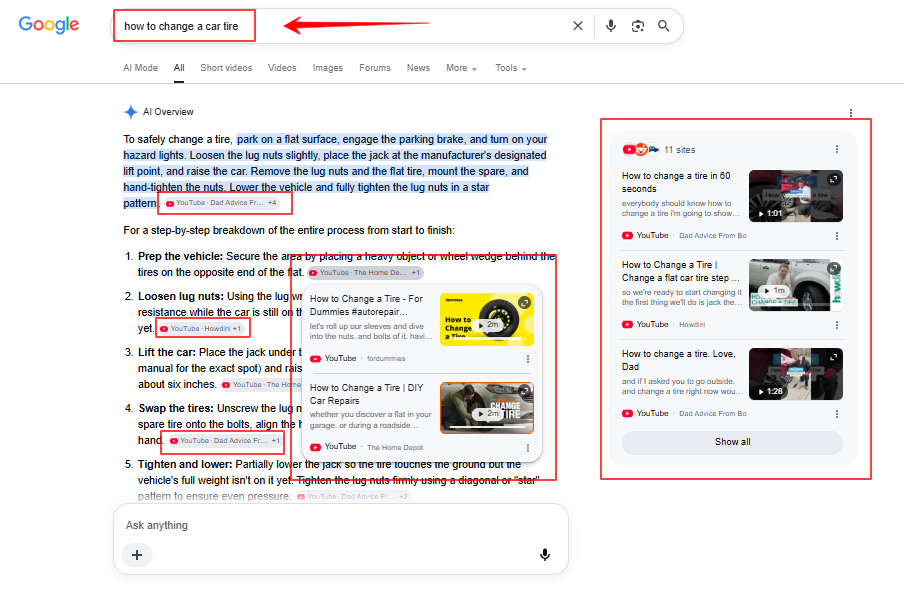
What you’re seeing: This screenshot is particularly interesting because it shows two things happening at once. The AI Overview generates a numbered step sequence, and YouTube video cards placed in the right side are embedded inline between the steps – not in a separate section. In this case, Google is blending text and video in the same answer block, which is increasingly common for how-to queries.
What the content looks like underneath: Pages that earn this placement use numbered lists with each step as its own item. The blog post section generally starts with an action verb (“Loosen the lug nuts,” “Place the jack under the frame”). Also, that section of page is organize into small steps using clear verbs; it’s much easier for Google to extract information from such a structure than from long paragraphs describing the same process.
5. Table Snippet Example
What it is: A structured table pulled directly from a page or generated from comparative content. This Google SERP snippet types is appeared for showing two or more items compared across multiple attributes.
What triggers it: Comparison queries, “X vs Y” searches, or any query where the answer naturally has rows and columns: specs, pricing tiers, feature breakdowns, or data sets.
Real example query: ram vs rom comparison
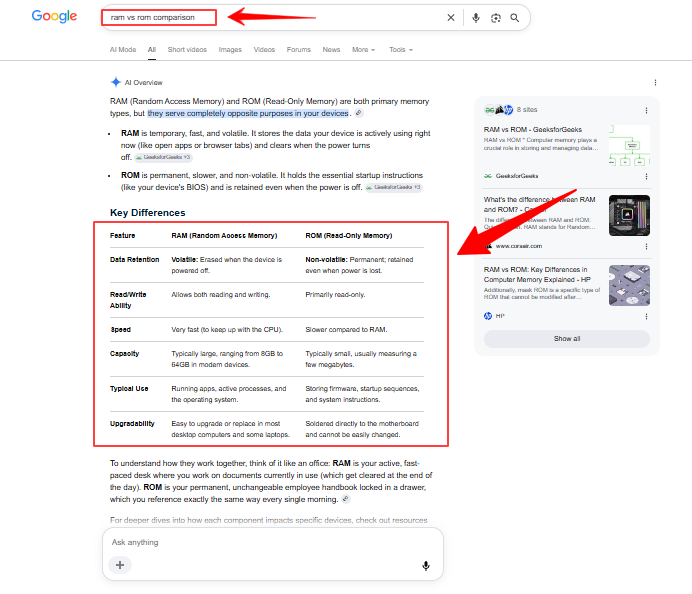
Apart from the above example, I want to show you something more interesting here. With the same query Google is showing a different snippet type. Here’s the screenshot:
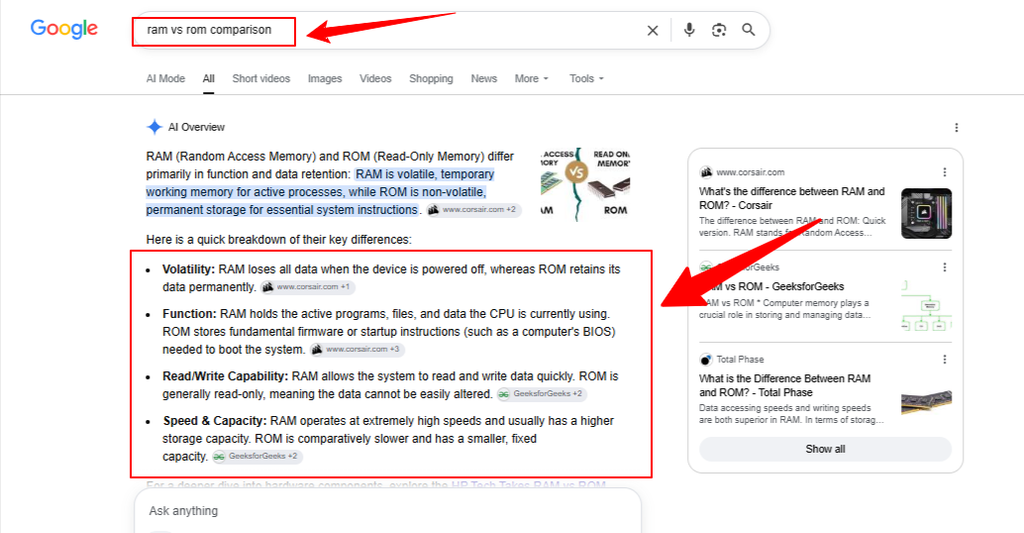
What you’re seeing: These two screenshots of the exact same query show two different formats: one with a table, one with a bulleted list. This is not a mistake. Google tests different presentation formats for the same query and may serve different results to different users or at different times. It’s a reminder that there’s no single “correct” format to target. Therefore, having both a well-structured table and a clear bulleted list in your content gives Google options to work with.
What the content looks like underneath: The table-winning version comes from pages that use actual HTML <table> markup with clear column headers. A table built with divs and CSS to look like a table is much less likely to be extracted than one built with proper semantic table elements.
6. Recipe Snippet
What it is: A structured answer for food and cooking queries, showing ingredients, equipment, and steps. Sometimes the SERP even shows with an image and timing information pulled from Recipe schema markup.
What triggers it: Specific recipe searches (“classic french omelette recipe,” “homemade banana bread recipe”) rather than general food queries (“what to cook for dinner”).
Real example query: classic french omelette recipe
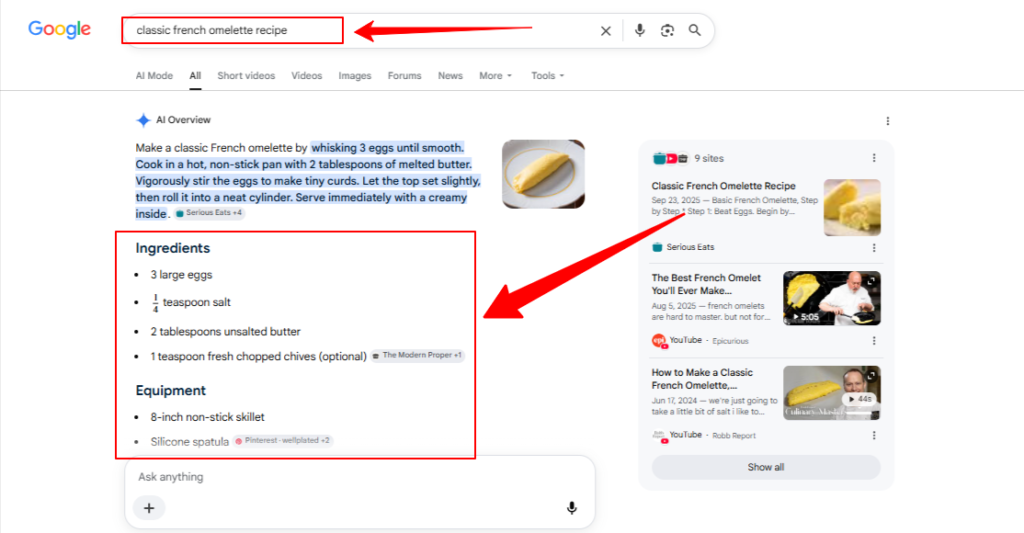
What you’re seeing: The recipe snippet here has three distinct layers. First, a prose summary of the technique – how to actually make the omelette. Then a clean ingredients list. Then an equipment list. Each section is clearly labeled and structured separately. The image appears alongside the text, pulled from one of the cited sources.
What the content looks like underneath: Recipe pages that earn this placement use Recipe schema markup (schema.org/Recipe), which explicitly tags ingredients, cooking time, steps, and images in machine-readable format. Without schema, a recipe page can still earn a snippet but with schema, it’s significantly more likely, and the additional details (timing, servings, nutrition) are much more likely to surface.
7. Tech Features / Bulleted List Snippet
What it is: A bulleted or sectioned list of product features, capabilities, or specifications, triggered by product-specific informational queries rather than transactional ones.
What triggers it: “[Product name] features,” “[Product] specs,” “what can [device] do,” or “what’s new in [product].”
Real example query: apple watch series 10 features
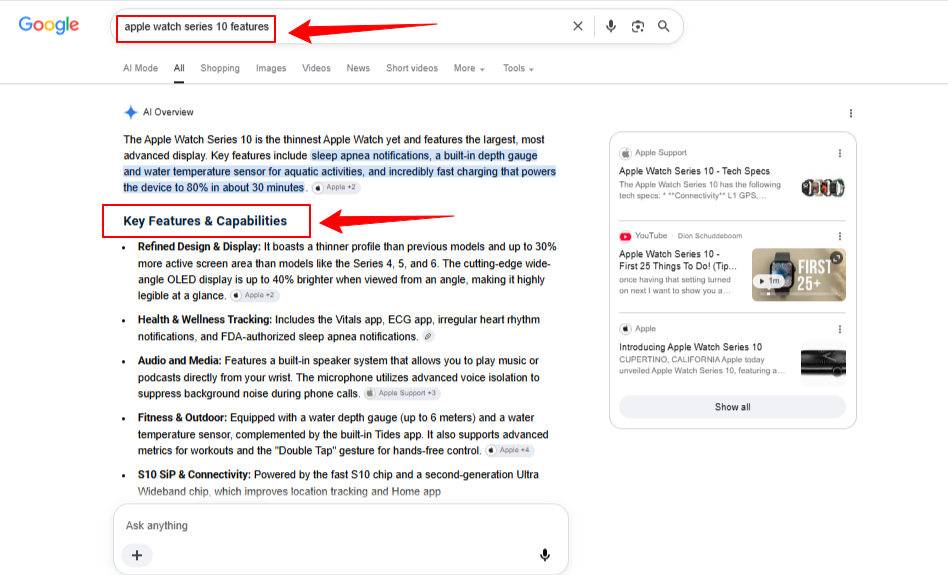
What you’re seeing: The format here mirrors the Vitamin D deficiency example – bold label, then explanation, but applied to a commercial product. The “Key Features & Capabilities” heading is generated by the AI Overview itself, not necessarily pulled verbatim from any single page. The sources cited include Apple’s own support pages, which signal that official manufacturer documentation gives huge value to product feature queries.
What the content looks like underneath: Pages that rank for this format typically structure features as subheadings (<h2> or <h3>) with a short descriptive paragraph under each one. A page that lists features in a wall of text, or buries them inside a long review, is much less likely to be extracted.
8. People Also Ask (PAA)
What it is: An expandable accordion section showing related questions that other users have searched, each with a brief answer that can be expanded. Technically not a featured snippet itself, but PAA answers follow the same extraction logic and are often pulled from the same pages that earn featured snippets.
What triggers it: Almost every informational query now shows a PAA section. It appears most prominently for queries where user intent is varied, people searching the same term for different underlying reasons.
Real example query: does vitamin c help with colds
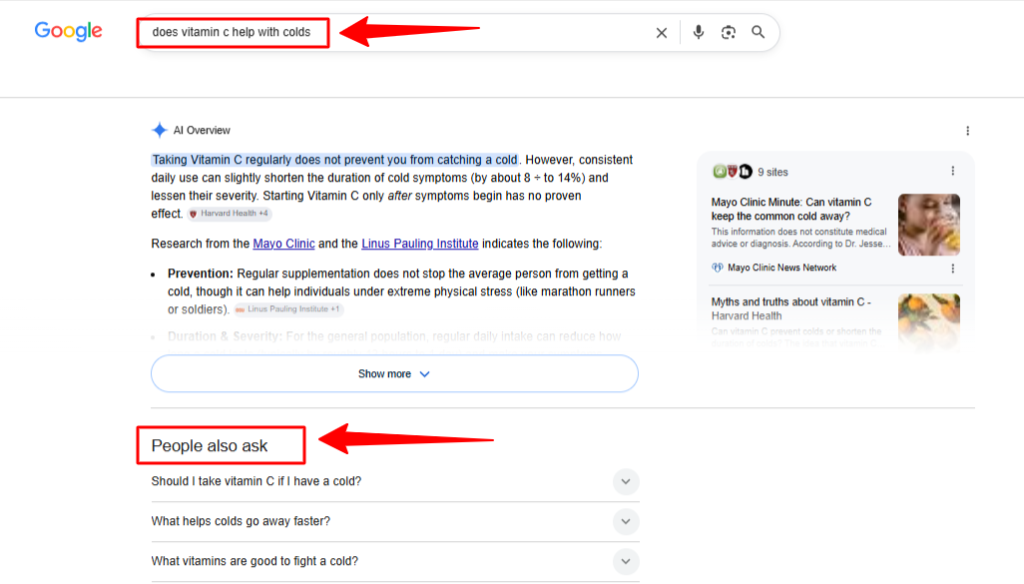
What you’re seeing: The PAA section here sits directly below the AI Overview. The three questions shown are all variations of the same underlying concern. They represent the most common follow-up queries from people who searched the original question. Each question has a collapsed answer that, when expanded, pulls a short response from a ranking page.
What the content looks like underneath: Pages that appear in PAA answers typically have FAQ sections, subheadings phrased as questions, or clear Q&A-formatted content. The answer under each question needs to be self-contained and meaningful even without the surrounding article context.
9. Local Pack
What it is: A map + three business listings that appear for location-based searches. This is the one type on this list that has nothing to do with on-page content optimization. It’s driven entirely by Google Business Profile signals.
What triggers it: “Near me” queries, location + service type queries (“coffee shops in London”), or any search where Google infers local intent even without an explicit location (“best pizza” while on a mobile device).
Real example query: coffee shops near me
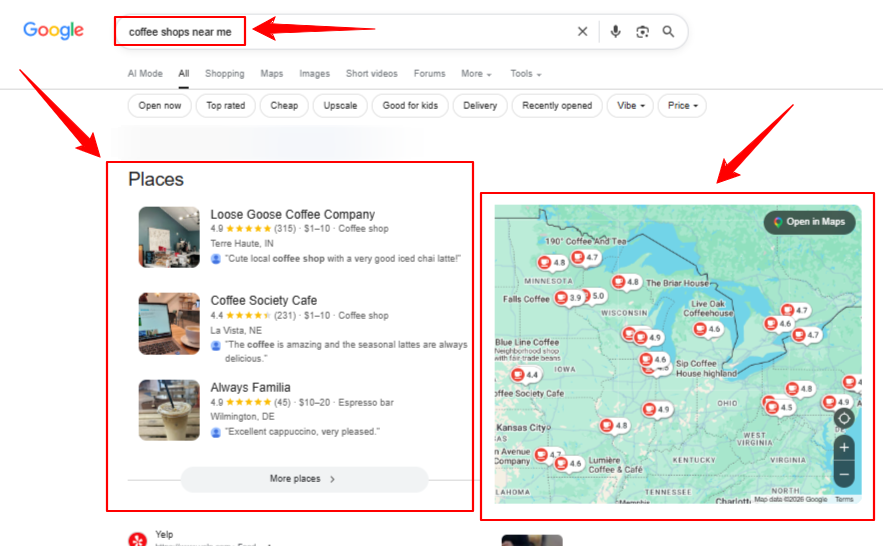
What you’re seeing: This is the most visually distinct result type in this entire list. There’s no article being cited, no paragraph being extracted. The result is built entirely from Google Business Profile data such as business name, category, location, rating, review count, price range, and user-submitted photos. The filter chips at the top (“Open now,” “Top rated,” “Upscale”) are part of Google’s local search refinement layer.
What the content looks like underneath: There is no “content” in the traditional sense. The lever here is your Google Business Profile – keeping it complete, accurate, and regularly updated with photos, posts, and review responses. For local businesses, this is a separate optimization track from everything else on this list.
How Featured Snippets Evolved Into AI Overviews
If you’ve been following along and looking at the screenshots in the previous section, you may have noticed something. Almost every single result shows an AI Overview at the top – not the classic featured snippet box that most SEO guides describe.
That’s not a coincidence. And it’s not a mistake in the screenshots.
Honestly, it’s the current state of Google Search.
The classic featured snippet: how it worked
From around 2014 onwards, Google started pulling short answer blocks from ranking pages and displaying them above all other results. One page. One answer. One clear attribution link below the extracted text.
If your page earned that spot, your URL appeared in the box. Users could see exactly where the answer came from. One click took them straight to your page. It was clean, clear, and single-sourced.
That format – the classic position zero box – is what most guides and tutorials about featured snippets describe. And for years, it was exactly what showed up when you searched most informational queries on Google.
How AI Changes Featured Snippet Position
Starting in 2023 with the rollout of Search Generative Experience (SGE), and accelerating through 2024 and into 2025, Google began replacing that single-source box with something different: a generative answer that synthesizes information from multiple sources rather than pulling from just one.
That is the AI Overview.
By mid-2026, AI Overviews appear on roughly 48% of all tracked queries, up 58% year-over-year. For the broad informational queries where classic featured snippets were most common – “what is,” “how to,” “types of,” “symptoms of” – AI Overview now dominates that position zero space.
Look back at the screenshots in Section 2. Every single one of them shows an AI Overview. The paragraph definition for “what is science fiction.” The numbered steps for “how to change a car tire.” The bulleted list for “symptoms of vitamin D deficiency.” The table for “ram vs rom comparison.” These are all AI Overviews now, not classic featured snippets.
Does Google Show Feature Snippet in Agentic Search
As we’ve said before there isn’t clear statement of this. But, classic featured snippets still appear in a few specific situations:
- Navigational queries where one source is clearly authoritative
- Some local and regional queries
- Certain queries in niches where Google hasn’t yet fully rolled out AI Overview
- Queries where the AI Overview format doesn’t add meaningful value over a single direct answer
But for the vast majority of informational searches, what you’re looking at today is AI Overview. The box at the top of the SERP has changed shape, changed source count, and changed behavior, even if it occupies the same visual space it always did.
Featured Snippets vs AI Overview: Same Space, Different Rules
Now that the distinction is clear, it’s worth looking at what actually changed between the two formats and, more importantly, what stayed the same. Knowing this will help you to understand how to write your website content in the agentic search era.
The clearest way to see the difference is side by side. Let’s see:
| Featured Snippets vs AI Overview | Classic Featured Snippet | AI Overview |
| Source | One page, one URL | Multiple pages, multiple citations |
| Answer type | Extracted text from the page | Generated and synthesized answer |
| Attribution | Single clear source link | Multiple inline citations |
| Click destination | One page gets the traffic | Traffic distributed across cited pages |
| Content control | Your exact words may appear | Google paraphrases and synthesizes |
| Format flexibility | Paragraph, list, or table | Paragraph, list, table, image, video |
| How to win | Rank in top 10 and best structure | Authority, depth, and citation signals |
But, where I want to focus most in this transition most is the move from extraction to generation. A classic featured snippet lifted your words directly from the page. AI Overview synthesizes across sources and may not reproduce your phrasing at all, but it does cite you, and cited pages earn meaningfully more traffic than non-cited pages that rank in the same position.
What Google Feature Snippet Shows in 2026
This is the reassuring part for content creators.
The underlying signals that earned a classic featured snippet are the same signals that earn an AI Overview citation. Google is still looking for the same things:
A direct answer near the top of the relevant section. Whether it’s extracting one sentence or synthesizing across sources, Google still rewards content that gets to the point quickly.
The right format for the right query type. Numbered lists for how-to queries. Tables for comparisons. Bullet points for collections of items. Paragraphs for definitions. This has not changed.
Clear heading structure. A question phrased as a heading, followed immediately by a direct answer, is still the most reliable structural pattern for earning position zero in any form.
Topical authority. A page that covers a topic comprehensively, not just the surface-level answer, but the context, nuance, and related questions around it. Therefore, that page ranks better and gets cited more often.
Source credibility. For health, finance, legal, and scientific topics especially, Google’s citation behavior in AI Overview strongly favors established, authoritative sources. This was true for classic featured snippets too, but it’s amplified in the multi-source AI Overview model.
How Your Website Page Looks like in Feature Snippet
With a classic featured snippet, winning meant your page owned that box. One URL. Your answer. Your click.
Nowadays, with AI Overview, winning looks different. Your page may be cited as one of several sources in the answer block. You don’t own the box but you’re credited inside it. The click behavior changes too: instead of one clear source link below the answer, users see multiple small citation badges inline with the text.
Research from Seer Interactive and BrightEdge consistently shows that brands cited inside AI Overviews earn significantly more organic clicks than brands that rank in positions 1 through 10 but aren’t cited. Citation has become the new position zero.
The practical implication: the goal has shifted from “how do I get the featured snippet” to “how do I become one of the sources Google cites.” Same discipline, slightly different framing.
A note on the terminology
Now, as you’ll going forward in this blog, “featured snippet” and “AI Overview citation” will sometimes be used together when referring to position zero optimization, because the content strategies that earn one largely earn the other. But, where the distinction matters specifically, I will be called out clearly.
How to Optimize for Featured Snippets and AI Overview Citations
The content strategies that earned classic featured snippets and the ones that earn AI Overview citations today are built on the same foundation. The format has changed. The fundamentals haven’t.
This section covers those fundamentals, and then in the next part, I will break them down by specific content type.
Answer first, detail after
This is the single most important structural principle for earning any form of position zero placement.
Most writers naturally build toward an answer. They set context, explain background, address nuances, and then, after several paragraphs, they arrive at the main point. That structure works well for essays. It works poorly for featured snippets and AI Overview citations.
Google extracts answers. It doesn’t wait for them. If the direct answer to a query is buried in paragraph four of a 2,000-word article, Google is much less likely to pull it, even if the article is excellent and ranks in position one.
The structure that works is the opposite: answer first, detail after.
What you have to do is: state the direct answer in the first sentence or two of the relevant section. Then follow with context, explanation, caveats, and depth. Think of it like a newspaper headline: the core fact goes at the top, the background fills in below.
A practical example. Instead of:
“There are many factors that affect how long it takes for a wound to heal, including wound depth, the patient’s age, nutrition, and whether any infection is present. In general, minor cuts and scrapes…”
Write it as:
“Minor cuts and scrapes typically heal within 3 to 7 days. The exact timeframe depends on wound depth, the patient’s age, nutrition, and whether infection is present.”
The answer is in the first sentence. Everything else supports it.
The question-answer-detail pattern
The most reliable structural pattern for earning featured snippets and AI Overview citations is:
- A subheading phrased as the target question (or a close variation of it)
- A direct answer in the first 1 to 2 sentences below that heading
- Supporting detail, context, and depth in the paragraphs that follow
This pattern works because it mirrors exactly what Google is looking for. The heading signals the topic. The immediate answer gives Google something to extract. The supporting detail gives the page the depth and authority that earns a top ranking in the first place.
One thing worth noting: the heading itself doesn’t have to be word-for-word identical to the search query. Google understands semantic similarity. “How does photosynthesis work?” as a heading can earn the snippet for “what is photosynthesis,” “explain photosynthesis,” and “photosynthesis process” not just the exact phrasing.
The 40 to 60 word answer block
For paragraph snippets specifically, the sweet spot for the direct answer block is roughly 40 to 60 words.
If you make it too short (under 20 words) and the answer feels incomplete, Google may not trust it to stand alone without context. Too long (over 100 words) and Google has to trim it, which usually means the extracted version loses coherence.
A well-crafted 40 to 60 word answer block:
- States the core fact or definition clearly
- Adds one layer of qualifying context
- Reads naturally as a standalone statement without needing the surrounding article
Count the words in the direct answer block underneath each heading, and aim to keep that block in range.
Matching format to query type
This is where many optimization guides stop at “use lists and tables” without explaining when and why. Here’s the actual logic:
Google matches the featured snippet format to the type of answer the query implies. So the right approach is to figure out what format the answer logically takes, then structure the content accordingly.
If the query is asking “what is” or “why does”: The answer is a definition or explanation. That’s naturally a paragraph. Write a clean, self-contained definition paragraph.
If the query is asking “how to” or “how do I”: The answer is a sequence of steps. That’s naturally a numbered list. Write it as numbered steps with action verbs at the start of each one.
If the query is asking “what are the types of” or “symptoms of” or “benefits of”: The answer is a collection of items with no required order. That’s naturally a bulleted list. Write it with clear labels and short explanations per item.
If the query is comparing two or more things: The answer is naturally a table. Build an actual HTML table with clear column headers.
If the query is a specific recipe: Use Recipe schema markup alongside the structured content.
Mismatching the format to the query type is one of the most common mistakes. A numbered list is wrong for a “what are the symptoms of” query because symptoms don’t have an order. A paragraph is wrong for a “how to” query because steps need to be discrete and sequential. The format should reflect the natural shape of the answer.
Heading structure and semantic clarity
Heading structure matters more than most people realize for featured snippet and AI Overview optimization.
The pattern that works best:
- Use H2 for major topic sections
- Use H3 for specific questions or subtopics within each section
- Place the direct answer immediately below the relevant H3, not two paragraphs down
- Avoid vague headings like “More information” or “Additional details” every heading should describe what the section directly answers
Google uses heading hierarchy to understand what a page covers and where specific answers live. A page with clear, descriptive headings that map directly to common queries in a topic area gives Google a structured roadmap to work from.
Schema markup: when it helps and when it doesn’t
Schema markup is machine-readable code added to a page that explicitly tells Google what type of content is on the page and what the key elements are.
For some content types, schema makes a meaningful difference:
Recipe schema tells Google the ingredients, cooking time, serving size, nutritional information, and steps, all in a structured format that Google can extract cleanly. Recipe pages without schema can still rank, but schema-marked-up pages are significantly more likely to appear with the full structured recipe display.
FAQ schema marks up question-and-answer pairs, making them more likely to appear in People Also Ask results and potentially in AI Overview citations.
HowTo schema marks up step-by-step processes, which can enhance how-to content in rich results.
For standard paragraph, list, and table content, schema is less critical. A well-structured HTML page with clean heading hierarchy, proper list markup (<ul>, <ol>), and semantic table elements (<table>, <th>, <td>) gives Google enough to work with without additional schema layers.
The mistake to avoid: treating schema as a shortcut. Adding FAQ schema to a page with thin, low-quality answers doesn’t earn a rich result. The schema signals the structure; the content still has to earn the placement.
What Prevents Website From Showing in Feature Snippet or AI Overview
Burying the answer. Long introductions before the main point consistently push content out of snippet contention. Get to the answer in the first sentence of the relevant section.
Using divs instead of semantic HTML. A comparison table built with <div> elements and CSS might look like a table visually, but Google’s crawler sees it as undifferentiated text. Use <table>, <th>, and <td> for actual tables. Use <ul> and <ol> for actual lists.
Vague or keyword-stuffed headings. A heading that says “Everything You Need to Know About Vitamin D Deficiency Symptoms” is harder for Google to use than one that says “What are the symptoms of vitamin D deficiency?” Be direct and specific.
Inconsistent answer blocks. A page that gives a direct answer under one heading but a vague lead-in under the next is an inconsistent signal. Apply the question-answer-detail pattern throughout the whole page, not just on the section being targeted.
Ignoring the content that already ranks. Before optimizing for a featured snippet on a given query, search that query yourself (in an incognito window) and look at what’s already showing at position zero. The format, length, and structure of the existing snippet tell exactly what Google prefers for that query.
Thin content with shallow answers. AI Overview in particular favors pages with genuine depth. A page that answers one question in 300 words is less likely to be cited than a page that covers the topic comprehensively and answers the related questions users naturally have.
How to Get a Featured Snippet or AI Overview Citation (By Content Type)
The previous section covered the general principles. This one applies them to each specific snippet format, using the query types from the above examples as the framework.
For definition and paragraph queries (“what is,” “what does,” “why is”)
The target is a clean, self-contained definition block of 40 to 60 words placed immediately below a question-phrased heading.
Structure the content like this:
- H3: What is [topic]?
- Paragraph 1: Direct definition or answer (40 to 60 words, complete on its own)
- Paragraph 2 onwards: Context, history, examples, nuance
Avoid starting the definition with “According to…” or “Many experts believe…” – these phrases signal uncertainty and push the actual definition further down. State the definition directly and confidently.
For the AI Overview citation, add depth below the definition. Cover the related questions users typically have about the same topic. A page that defines a term and then covers its types, uses, examples, and common misconceptions is far more likely to be cited than a page that defines the term and stops there.
For how-to and step-based queries (“how to,” “how do I,” “steps to”)
The target is a numbered list where each step starts with an action verb and contains enough detail to be understood on its own.
Structure the content like this:
- H2 or H3: How to [task]
- One to two sentence overview of the process (optional but helpful for AI Overview)
- Numbered list with each step as its own item
- Each step: action verb first, then brief explanation
Keep steps discrete. “Loosen the lug nuts” is a step. “Loosen the lug nuts, then jack up the car, and remove the flat tire” is three steps compressed into one – Google will struggle to extract it cleanly.
For the AI Overview citation specifically, include a summary paragraph before the numbered list. The screenshots in Section 2 show that AI Overview often generates an introductory summary sentence before presenting the numbered steps – pages that already have that structure in their content are easier for Google to work with.
For collection and list queries (“types of,” “symptoms of,” “benefits of,” “examples of”)
The target is a bulleted list with bold labels and short explanations per item.
Structure the content like this:
- H3: [Types / Symptoms / Benefits] of [topic]
- Optional one-sentence intro
- Bulleted list: bold label, then 1 to 2 sentence explanation
The bold label is important. Look back at the “symptoms of vitamin D deficiency” screenshot – every bullet starts with a bold term (“Muscle and Bone Aches,” “Fatigue and Low Energy”). That pattern appears consistently in bulleted list snippets and AI Overview extractions. It makes each item scannable and gives Google a clean label to work with.
For comparison queries (“X vs Y,” “difference between X and Y”)
The target is an HTML table with clear column headers and concise cell content.
Structure the content like this:
- H3: [Topic A] vs [Topic B]: Key Differences
- Brief introductory paragraph (1 to 2 sentences)
- HTML table: first column = attribute, subsequent columns = each option being compared
- Follow-up paragraph summarizing the main takeaway
Critical technical detail: use actual <table> HTML markup. The table must have <th> elements for column headers. Cell content should be short – one phrase or one sentence per cell. Long paragraphs inside table cells break the visual scanning that makes tables useful, and they’re harder for Google to extract cleanly.
For AI Overview, having both a table and a bulleted version of the same comparison information on the page gives Google format flexibility. The “ram vs rom comparison” screenshots showed two different formats served for the same query – a table in one session and a bulleted list in another. Having both in the content covers both possibilities.
For recipe queries
The target is structured recipe content with Recipe schema markup.
Structure the content like this:
- Recipe name as H1 or H2
- Brief description (1 to 2 sentences)
- Key metadata: prep time, cook time, servings
- Ingredients as a bulleted list
- Equipment as a bulleted list (optional but valuable)
- Steps as a numbered list
- Recipe schema markup (schema.org/Recipe) wrapping all of the above
The “classic french omelette recipe” screenshot shows exactly this structure surfaced in the AI Overview: a brief method summary, then ingredients as a labeled bulleted list, then equipment. Pages that use Recipe schema make it significantly easier for Google to identify and extract each component cleanly.
For product feature queries (“[product] features,” “[product] specs”)
The target is a structured features section where each feature is a subheading or bold label followed by a short description.
Structure the content like this:
- H2: Key Features of [Product]
- For each feature: H3 or bold label, then 2 to 3 sentence description
- Keep each feature description self-contained
The “apple watch series 10 features” screenshot shows the AI Overview generating its own “Key Features and Capabilities” section header, but the content inside it is extracted from pages that use exactly this structure. Official manufacturer documentation (Apple Support, in that example) carries significant weight for product feature queries, which means third-party review pages need to be especially well-structured and comprehensive to compete.
For local queries (“near me,” “[service] in [city]”)
The target is not on-page content at all. It’s Google Business Profile.
For local pack placement:
- Claim and fully complete the Google Business Profile for the business
- Choose the most accurate primary category
- Keep the name, address, and phone number consistent across all online mentions
- Add photos regularly
- Respond to reviews promptly
- Use Google Posts to add fresh content to the profile
On-page SEO still matters for appearing in local organic results below the pack, but the three-listing local pack shown in the “coffee shops near me” screenshot is driven almost entirely by proximity, relevance signals, and Business Profile quality – not by article structure or schema markup.
Mobile vs Desktop – Do Featured Snippets and AI Overviews Look Different?
The short answer is yes and noticeably so. The content that earns position zero is the same regardless of device, but the way it’s presented to the user is quite different. This matters because most searches now happen on mobile, and the experience your potential visitors have before they ever click on your page varies significantly depending on what device they’re using.
Screen real estate changes everything
On desktop, Google has roughly 1,280 pixels of horizontal space to work with. That means the AI Overview or featured snippet sits on the left side of the screen, with organic results, knowledge panels, video carousels, and People Also Ask sections filling the right sidebar and the space below. Users can see the AI Overview and at least part of the organic results in the same viewport.
On mobile, there is no sidebar. Everything stacks vertically. The AI Overview takes up the full width of the screen which on a typical smartphone means it fills the entire visible area before any scrolling. A user searching on mobile may have to scroll past the entire AI Overview, any featured image, and a People Also Ask accordion before they see a single organic result.
This has a direct traffic implication. On desktop, a user can see your page title in the organic results even while reading the AI Overview. On mobile, your organic listing is completely out of view until they scroll. The user has to actively choose to scroll past the AI answer which many don’t.
How AI Overview behaves differently on each device
On desktop, AI Overview typically shows 3 to 5 sentences of generated text, sometimes with a bulleted or numbered breakdown below, and source citations appearing as small inline badges. A “Show more” button expands the full response if the user wants it.
On mobile, the AI Overview often shows a shorter initial preview – sometimes just 2 to 3 sentences with a more prominent “Show more” button below. This compressed format is partly a screen space decision and partly a behavioral one: mobile users tend to scroll faster and read less per screen. The citation badges are smaller and sometimes collapsed into a count (“3 sources”) rather than showing individual domain names.
One other mobile-specific behavior worth noting: voice search on mobile frequently triggers a spoken AI Overview response before showing any visual results at all. If a user asks Google Assistant a question verbally, the first thing they hear is the synthesized AI answer – your page may be cited in the text version of that response, but it won’t be read aloud.
People Also Ask on mobile vs desktop
The People Also Ask section behaves similarly on both devices but feels more prominent on mobile. On desktop, PAA typically appears below the featured snippet or AI Overview and above or between organic results, with a compact accordion layout.
On mobile, PAA takes up more relative screen space because everything is full-width. Each question card is larger and easier to tap, and Google often shows PAA in multiple places on the mobile SERP – sometimes directly below the AI Overview and again further down the page between organic results. This repetition makes PAA optimization more valuable on mobile because the placement appears more than once in the same search session.
Structured data rendering differences
Tables render differently on mobile. A comparison table that displays cleanly in a three-column format on desktop may be too wide for a mobile screen, causing Google to either truncate it, reformat it as a bulleted list, or not display it at all in the snippet format. This is one reason why the “ram vs rom comparison” screenshots showed a table on one result and a bulleted list on another – device type is one of the variables that influences which format Google chooses.
The practical implication: if a comparison table is critical to a page’s content, it should be responsive. Either the table uses horizontal scrolling on mobile, or an alternative bulleted version of the same information is present on the page so Google has a mobile-friendly format to extract.
Image handling on mobile
Recipe snippets and answer boxes that include images display those images more prominently on mobile than on desktop. On desktop, the image sits beside the text answer. On mobile, it often appears above or below the text block at full width. This makes image quality and relevance more important for mobile snippet appearance than many optimization guides acknowledge.
For any content type where an image is likely to accompany the snippet, like recipes, product features, and how-to guides. Use a high-quality, clearly descriptive image with a relevant file name and alt text to give Google a better option to surface alongside the answer.
The mobile-first optimization takeaway
Since Google uses mobile-first indexing, it crawls and evaluates the mobile version of a page as the primary version. The mobile presentation of content is what matters most for earning featured snippets and AI Overview citations.
The practical checklist for mobile featured snippet readiness:
- Answer blocks are visible without horizontal scrolling on a 375px viewport
- Tables either scroll horizontally or have a bulleted alternative version
- Images have descriptive alt text and are sized appropriately for mobile
- Page loads in under 3 seconds on a mobile connection (slow pages rank lower, which means less snippet eligibility)
- Text is readable without zooming – minimum 16px font size for body text
Frequently Asked Questions
What is an example of a featured snippet in search results?
What is a rich result in search?
Can you show me a featured snippet example for a product comparison?
What are good examples of answer boxes?
How do companies optimize content to get featured snippets?
What is an example of a featured snippet for a recipe search?
What content format works best for immediate answers?
What is a featured snippet example explaining a tech gadget’s features?
What are the differences between mobile and desktop AI Overview or featured snippet?
Wrap Up!
Featured snippets didn’t disappear. They evolved.
The position zero space that Google introduced in 2014 to give users faster answers still exists in 2026. It still rewards the same underlying content qualities: direct answers, clear structure, the right format for the right query, and genuine topical depth. What changed is the mechanism: from a single-source extraction to a multi-source generative answer, and the name: from featured snippet to AI Overview.
For anyone optimizing content today, the practical work is the same whether the target is labeled “featured snippet” or “AI Overview citation.” Write direct answers. Structure content to match the natural shape of the query. Use semantic HTML. Build depth around the topic. Earn authority in the subject matter.
The screenshots throughout this blog show what position zero actually looks like on Google in 2026. Every single one of them is an AI Overview. And every single one of them was earned by a page that got the content fundamentals right.
That’s the path in. Get the answer to the top. Get the structure right. Get cited.
Leave a Reply