
If you run a large website, there is a good chance Google is not crawling all of your pages. And if Google is not crawling them, it is definitely not indexing them. That means no rankings, no traffic, and no visibility. No matter how good your content is.
This is what we call a crawl budget problem. And for big sites, it is one of the most important technical SEO issues to solve.
In this guide, you will learn exactly what crawl budget is, why it matters, what wastes it, and most importantly, how to optimize crawl budget so Google spends its time on your best pages.
What Is Crawl Budget for Websites?
Crawl budget is simply how fast and how many pages Google wants to crawl on your website within a given period of time.
Think of it like a daily visit allowance. Google has limited resources and can’t index every page on the internet, so it gives each website a share of its attention. If you have more pages than Google can get through in its visits, some pages will be left out.

Crawl budget consists of two main components: Crawl Rate Limit, which is the maximum number of requests a search engine makes to a site without overloading the server, and Crawl Demand, which is the priority Google assigns to crawling certain URLs based on their importance, freshness, and popularity.
These two factors work together to determine how much of your site Google actually sees.
The Crawl Capacity Limit (also called Hostload) is essentially your server’s ability to handle Googlebot’s requests. If your server is fast and stable, Google can crawl more. If it is slow or returning errors, Google backs off to avoid crashing it.
Crawl Demand is about how much Google actually wants to crawl your site. Popular pages, freshly updated, and those with unique content get prioritized. Pages that are thin, duplicated, or rarely linked to get ignored.
Why Crawl Budget Matters in SEO
Before a page can rank, it has to be indexed. Before it can be indexed, it has to be crawled. That chain is non-negotiable no matter how good your content is.
When your crawl budget hits zero, search engines like Google can no longer crawl your pages completely. This means it takes longer for your pages to be processed and added to the search index. As a result, your content won’t appear on search engine results pages as quickly as it should.
In the worst cases, important pages of your website simply never get discovered at all.
One thing worth clearing up early: crawling rate is not a ranking factor. Getting Googlebot to crawl more pages does not move you up in search results. What it does is make sure your best pages are actually in the index so they have a chance to rank in the first place.
Who Actually Needs to Worry About Crawl Management?
Here is the honest answer: not everyone has to think about optimizing crawl budget.
If your website is under 10,000 pages, then you do not need to worry about crawl budget. Besides, if your pages get indexed within a day of publishing, this problem does not apply to you.
But if you fall into any of the categories mentioned below, crawl budget optimization is worth seriously considering for your technical SEO efforts:
- Large sites with 1 million or more unique pages where content changes moderately often (roughly once a week).
- Medium to large sites with 10,000 or more unique pages that update very frequently, such as daily.
- Sites where a large number of URLs are showing up in Google Search Console as “Discovered — currently not indexed.”
- E-commerce sites with faceted navigation generating thousands of URL combinations.
- News sites or content platforms publishing new articles faster than Google can index them.
If you run a large e-commerce store, a portal with faceted navigation, a site with a history of migrations, or an architecture with many parametric URLs, crawl budget may be the bottleneck explaining why your pages do not appear in Google despite having good content.
What Eats Up Your Crawl Budget?
Before you can fix the problem, you need to know what is causing it. Let’s know some the most common crawl budget wasters.
Faceted Navigation and Query Strings
This is the biggest culprit on e-commerce and directory sites. Query strings (also known as URL parameters) can lead to inefficient crawling, high bandwidth consumption, and delays in indexing your most important content. When users filter by color, size, price, and brand, every combination creates a new URL. The number of URLs can go from 5,000 to 5 million overnight, and Googlebot will try to crawl all of them.
Session IDs in URLs
Session identifiers in URLs are particularly damaging to crawl budget because they generate a brand-new, unique URL for every individual user or bot session. And these URLs trap crawlers in “infinite spaces.” The fix is simple: track sessions through cookies, not URLs.
Duplicate Content
Multiple URLs pointing to the same or very similar content split your crawl budget across identical pages. Google has to fetch all of them before it realizes they are the same thing.
Soft 404 Pages
A soft 404 is when a page shows an error message or empty content to the user but returns a successful 200 HTTP status code to Google. In this case, Googlebot has no way of knowing the page is useless, so it keeps crawling it over and over, wasting visits and crawl budget.
Redirect Chains
Long redirect chains have a negative effect on crawling. Every extra hop in a redirect chain costs time and bandwidth. If you have pages redirecting through three or four steps before reaching the final URL, each step eats into your budget.
Infinite Spaces
Dynamically generated elements like calendars that link to unlimited past and future dates, or broken relative links that stack directories infinitely, can trap Googlebot in a loop with no end.
Crawl Budget Optimization: Core Strategies
Now for the part that matters: what you can actually do about crawl budget optimization. Let’s discuss some crucial measures that you can follow to manage your website crawl budget.
Strategy 1: Manage Your URL Inventory
The most powerful thing you can do is cut down the number of low-value URLs Googlebot has to deal with.
Use robots.txt to block crawling of unimportant pages. This includes things like login pages, admin dashboards, staging environments, filtered search results, and sorting pages.
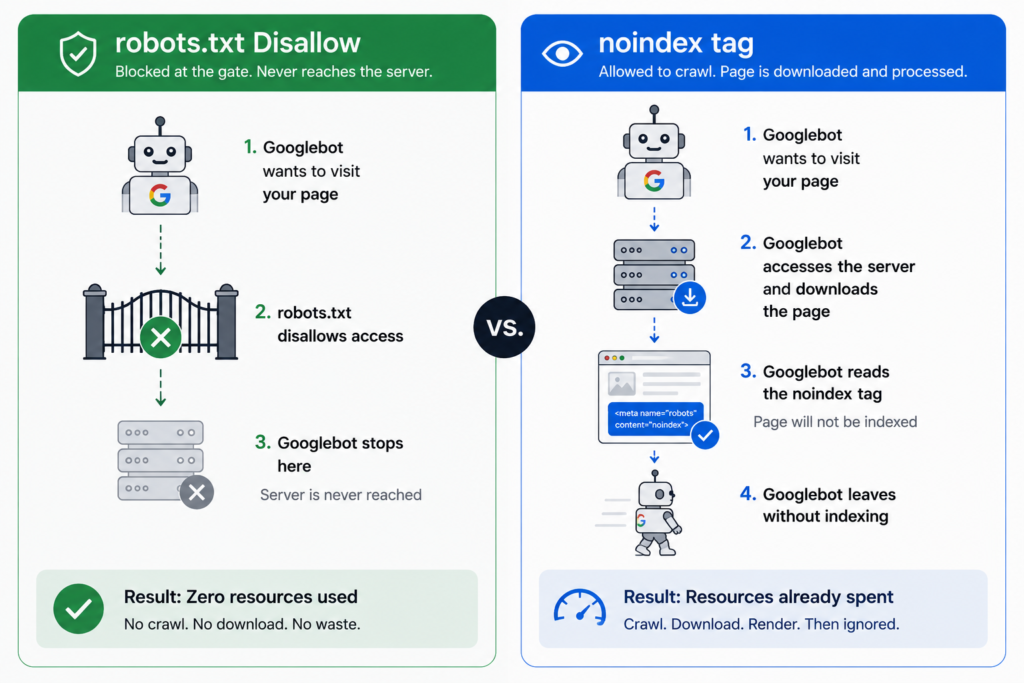
There is a critical distinction to understand here: use robots.txt, not noindex tags, for this purpose. Search engine bots must successfully download and read the HTML of a page to discover a noindex tag.
This means your server still has to process the connection and serve the bytes, consuming crawl capacity. Because crawlers parse the robots.txt file at the root of your site before attempting to crawl any sub-pages, a Disallow rule blocks the request before it ever hits your server, fully preserving your host capacity.
Fix soft 404s so that deleted or empty pages return a proper 404 (Not Found) or 410 (Gone) status code. Consolidate duplicate content using canonical tags or by restructuring your URL architecture. Clean up redirect chains and make them direct, single-hop redirects wherever possible.
Strategy 2: Improve Loading Efficiency
If Google can load and render your pages faster, it might be able to read more content from your site. Server speed is directly tied to how many pages Googlebot can get through in a single session.
Keep your HTML lean. There is a hard technical limit here that many site owners don’t know about. Googlebot fetches only the first 2MB of most file types, including HTTP headers. Any data beyond these limits is ignored, meaning critical content or metadata should be placed high up in the HTML document to ensure discovery.
If your pages are bloated with inline CSS, inline JavaScript, or Base64-encoded images embedded directly in the HTML, you are burning through that 2MB faster than you should. Move heavy styles and scripts to external files instead.
Put the most important elements at the top of your HTML, like title tags, meta tags, canonical declarations, and structured data. Even if a page is slightly over the limit, these elements will have already been read.
Strategy 3: Streamline Crawler Communication
Before search engines come to crawl your website, you, as the website owner, need to determine and tell the crawlers clearly which pages need to be crawled.
Keep your XML sitemaps clean and updated. Only include URLs you actually want indexed. Use the lastmod tag to tell Google exactly when a page was last updated, so it knows which pages to prioritize for recrawling.
Implement HTTP caching properly. Support ETag and Last-Modified response headers. When Googlebot crawls a page that has not changed, the server can return a 304 (Not Modified) status code with no response body, saving server processing time and improving crawl efficiency.
This is one of the most underused crawl optimization techniques available, and it essentially lets your server say “nothing changed here” without doing any real work.
Crawl Budget Optimization for E-Commerce Websites
E-commerce sites face the crawl budget problem more than almost anyone else, and the stakes are higher too. If Google is not indexing your product pages, those products simply do not exist in search. Then, your crawl management has to deal with this issue urgently.
The main problem is always faceted navigation. A clothing store with 10 colors, 8 sizes, 5 brands, and 4 sorting options can theoretically generate hundreds of thousands of unique URL combinations from a single category page. Most of those pages are nearly identical.
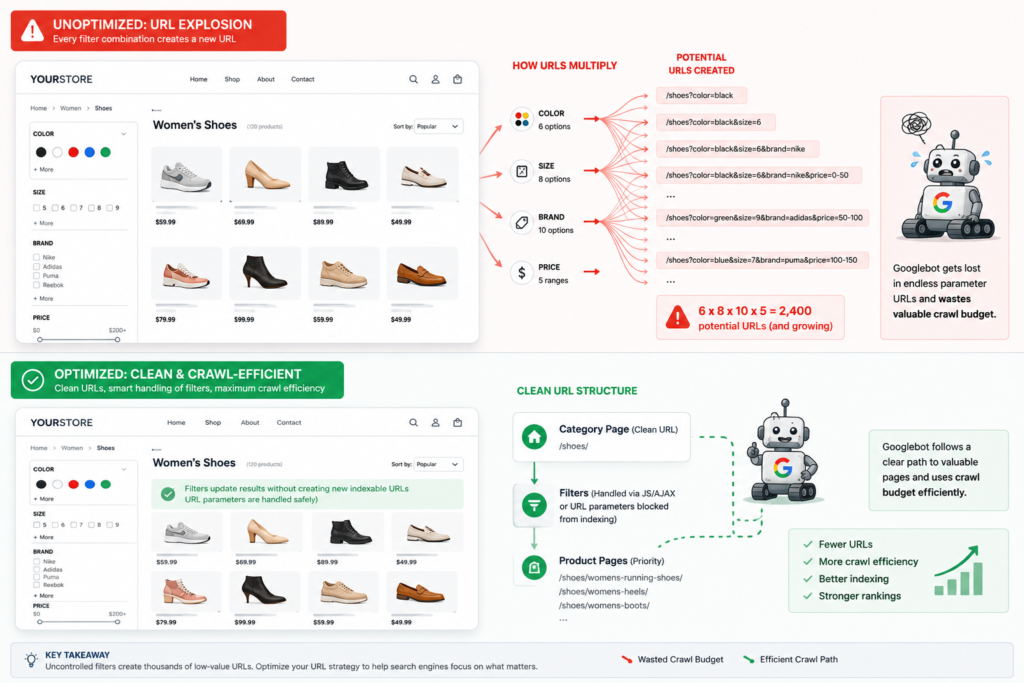
The best approach for non-indexed filter variations is to block them in robots.txt using Disallow rules for query parameters. An alternative is to build your filtering system using URL fragments (the # character) instead of query parameters. Since Google generally does not crawl or index URL fragments, these filtered variations will never be requested in the first place.
For any filtered pages that do stay crawlable, use rel=”canonical” tags pointing back to the clean, unfiltered category page.
Handle out-of-stock products carefully. If a product combination has zero inventory, return a 404 status code. Do not show an empty page with a 200 response. Then, that is a soft 404, and it will be crawled endlessly.
AI bot crawling surged significantly in recent years, with GPTBot, ClaudeBot, PerplexityBot, and others now competing for the same server bandwidth. Every request your server handles reduces its available capacity for the next request. For e-commerce sites on shared or limited hosting, this is now a real issue. Use robots.txt to control which AI crawlers can access your site without affecting Googlebot.
How Query Strings Impact Crawl Budget
URL parameters deserve their own section because they are so commonly misunderstood and so commonly damaging.
The problem is not that parameters exist. The problem is that they multiply URLs exponentially. A parameter for color, combined with a parameter for size, combined with a parameter for sorting, creates a combinatorial explosion of URLs, most of which show nearly identical content.
The sad part is, Google’s crawler cannot tell whether a parameter-based URL contains unique content without fetching it first. So it fetches all of them. This results in your crawl budget being tied up with hundreds of unnecessary variations, while your real product pages wait in line.
The fix: block parameter URLs in robots.txt where they do not need to be indexed. Use URL fragments for filter interfaces where possible. Implement rel=”canonical” on parameter pages that do stay crawlable. And absolutely do not use session IDs in URLs; use cookies instead.
Technical Constraints Every Site Owner Should Know
In this part of my “Crawl Budget Optimization” guide, I want to discuss some of the crucial technical constraints that website owners and SEO practitioners should be aware of. Let’s know them:
The 2MB HTML Cutoff
Google only crawls the first 2MB of a page’s HTML source. Beyond that, content is truncated and never indexed. This limit applies to uncompressed data, so even if you are serving gzipped HTML, the threshold is measured on the raw size. PDF files have their own separate limit of 64MB.
The Web Rendering Service
When Googlebot crawls a page, it also has to render it. It means it has to load CSS, execute JavaScript, and process any dynamic content. Time spent rendering counts as much as request latency toward your crawl budget. A page that loads fast but renders slowly still consumes significant crawl capacity. This is why JavaScript-heavy pages can quietly drain your budget even when your server response times look fine.
How to Monitor Your Website Crawl Budget
You cannot optimize what you do not measure. And this happens for your website crawl budget too. This is why I am putting this section in my guide so you can precisely understand and track when you’re optimizing your website crawl budget. Here are the tools to use.
Crawl Stats Report in Google Search Console
This is your primary dashboard. It shows total crawl requests over time, download sizes, and average server response times. Watch for sudden drops in crawl frequency or spikes in error responses. These usually signal a problem on your server or a sudden explosion in low-quality URLs.
URL Inspection Tool
Use this to check individual URLs and see how Googlebot renders them. If you see a “Hostload exceeded” warning, your server is the bottleneck here. Googlebot wants to crawl more pages, but your server capacity is holding it back.
Server Log File Analysis
Quarterly, analyze server log files to verify Googlebot is spending budget on your priority pages, not wasting URLs. Log files show you exactly which bot visited which URL and when. This is the most granular view available and often reveals crawl waste that other tools miss entirely.
Common Crawl Budget Myths
There are some misconceptions in the SEO industry about crawl budget usage and optimization. Here I’m addressing some misconceptions to help you manage your crawl budget properly.
Myth 1: More crawling means better rankings. Crawling gets your pages into the index. Once they are in, crawl rate does not affect their ranking.
Myth 2: Compressing sitemaps saves crawl budget. Zipped sitemaps still have to be fetched. The compression does not meaningfully reduce the crawl resources needed.
Myth 3: Google honors the crawl-delay rule in robots.txt. It does not. Google’s crawlers ignore the non-standard crawl-delay directive entirely.
Myth 4: Embedded assets do not count toward crawl budget. CSS files, JavaScript files, and XHR requests made during rendering all consume crawl resources. They have their own individual byte limits.
Myth 5: 4xx errors waste crawl budget. Standard 4xx errors (except 429) actually do not waste much budget. Google simply retrieves the header status code and drops the request without processing full page content. The real wasters are soft 404s, not true 404s.
Frequently Asked Questions About Crawl Budget
What is crawl budget in SEO?
Does Google have a crawl budget?
How does Google allocate crawl budget?
How does crawl budget work?
How to calculate crawl budget for large websites?
How to check crawl budget?
How to increase crawl budget?
How to optimize crawl paths in complex websites?
How does Googlebot process crawl budget?
How do server response times impact crawl budget?
Does page speed affect Google crawl budget?
Does faster server response improve Google crawl budget?
How to reduce crawling by Google?
How to fix crawl budget issues?
How to track and improve crawl budget over time?
Can crawling bots increase load on the server?
Do all websites get the same crawl budget?
How can a crawl budget run out?
Wrap Up!
Crawl budget optimization is not about tricking Google. It is about making Google’s visits to your site as productive as possible.
When Googlebot has limited time on your site, you want it spending that time on your best, most valuable pages. And not chasing filtered parameter URLs, duplicate product listings, or empty pages that forgot to return the right status code.
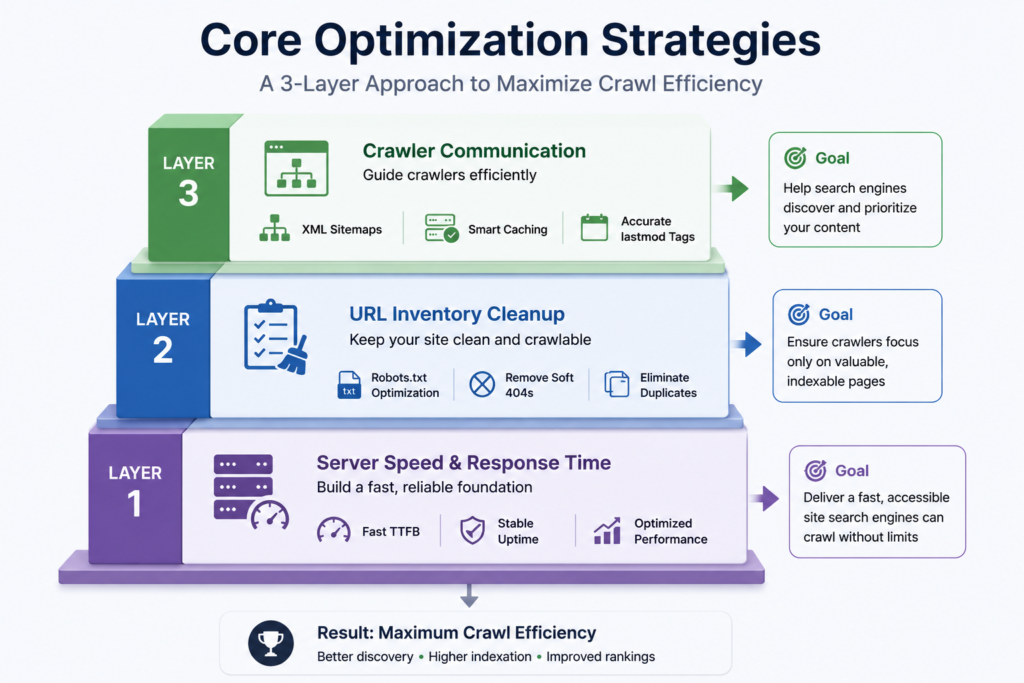
The priority order is straightforward: fix your server speed first, clean up your URL inventory second, and streamline how you communicate with crawlers third.
For smaller sites, none of this may be pressing. But if you run a large e-commerce store, a news site, or any platform generating URLs faster than Google can crawl them, these optimizations can be the difference between thousands of pages sitting invisible in the “Discovered – currently not indexed” pile and those same pages actually showing up in search.
Start with Google Search Console’s Crawl Stats report. Look at what Googlebot is spending its time on. And then make sure the answer is: your best content.
Leave a Reply